September 14, 2026 · 7 min read
Games vs apps: different App Store screenshot playbooks
Games and utility apps invert caption placement, orientation, and Play minimums. Measured differences from 99 listings plus Apple and Google rules.
Games and utility apps do not share one screenshot playbook. The same canvas that works for a banking app often looks wrong on a puzzle game, and Google Play publishes different recommendation minimums for each.
That is not vibes. We measured 99 top-charting US App Store listings (49 apps, 50 games) on 22 August 2026, plus preview prevalence on a 100-listing sample on 18 August. Apple and Google primary docs were re-read on 14 September 2026. The patterns below are category defaults you need a reason to break, not conversion guarantees. Neither store publishes install lift by screenshot style.
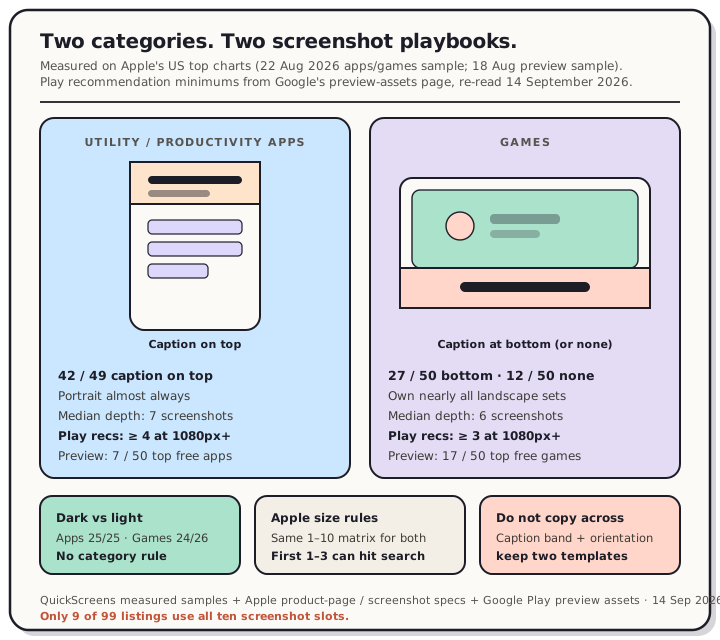
Read the chart description
Teardown comparing utility apps and games. Apps put captions on top (42 of 49), stay portrait, and need four 1080px Play recommendation screenshots. Games put captions at the bottom or none (27 bottom, 12 none of 50), own nearly all landscape sets, need three Play screenshots, and ship iPhone previews more often (17 of 50 vs 7 of 50). Sourced from QuickScreens 99-listing and 100-listing samples plus Apple and Google docs re-read 14 September 2026.
What actually differs (measured)
| Dimension | Apps | Games | Source |
|---|---|---|---|
| Caption on first screenshot | Top in 42 of 49; bottom in 5; none in 2 | Bottom in 27 of 50; top in 11; none in 12 | 99-listing sample, 22 Aug 2026 |
| Orientation | Almost always portrait | Nearly all landscape sets are games (8 of 9 landscape listings; 1 mixes) | Same sample |
| Median screenshot count | 7 | 6 | Same sample; only 9 of 99 use all ten slots |
| Canvas dark vs light | 25 / 25 | 24 / 26 | Dark vs light, 20 Aug 2026 |
| iPhone app preview present | 7 of 50 | 17 of 50 | Preview vs screenshots, 18 Aug 2026 |
| Play recommendation screenshots (highly recommended) | At least four at 1080px+ | At least three at 1080px+ | Google Play preview assets, re-read 14 Sep 2026 |
Apple's own product-page guidance (re-read 14 September 2026) is category-agnostic on count and size: up to 10 screenshots, and "depending on the orientation of your screenshots, the first one to three images will appear in search results when no app preview is available." Accepted sizes still come from App Store Connect screenshot specifications (re-read same day): JPEG/PNG, no alpha, 1–10 files. Orientation and caption placement are where the charts diverge.
Caption placement inverts for a structural reason
Utility screenshots are mostly interface. Interfaces put their own labels near the top, so marketing copy needs a clear band above the artwork. That is what 42 of 49 apps do.
Game frames are mostly art with a heads-up display already crowding the top edge. The empty band is usually the bottom. 27 of 50 games put the caption there (often two or three loud words on a coloured plate). Another 12 ship no marketing caption at all and just show play.
If you are shipping a game and copying caption-on-top advice written from productivity samples, you are copying the other category's convention. Full methodology and edge cases live in the screenshot examples teardown. Caption type still has to survive the tiny render size on the product page; that measurement is in caption size.
Landscape is a games pattern, not a general one
In the 99-listing sample, 90 sets are portrait throughout. Eight are landscape throughout and one mixes. All but one landscape listing are games (Fortnite, Among Us!, 8 Ball Pool, Call of Duty Mobile, and others). The single non-game is a game accessory.
For a portrait utility app, landscape is effectively off the field. For a game that plays in landscape, matching the play orientation is normal. Search still only shows the first one to three frames when there is no preview, so the first landscape tile has to read as a game at search-card size. We covered that surface in the first three screenshots.
Play's 4 vs 3 minimum is a real rule split
On Google Play, the hard publish floor is low: a minimum of two screenshots across device types (JPEG or 24-bit PNG, no alpha, min 320px, max 3840px, long side ≤ 2× short side). Re-read from Google's preview-assets page on 14 September 2026.
Eligibility for large-format recommendation surfaces is stricter, and it splits by category under "Highly recommended":
- Apps: at least four screenshots at minimum 1080px, 16:9 landscape or 9:16 portrait.
- Games: at least three 16:9 landscape or three 9:16 portrait screenshots at the same 1080px floor, depicting the in-game experience.
Google also says a preview video "is not required, but we highly recommend providing a preview video for games particularly," and that a game "requires a preview video to be shown in certain parts of Google Play." That lines up with our Apple-side count: games ship iPhone previews more than twice as often as apps (17 of 50 vs 7 of 50). Tablet and Chromebook export rules are separate; see Play tablet and Chromebook screenshots.
What not to copy across categories
Do not paste an app caption band onto a game HUD and call it done. You will cover the play space the listing is trying to sell.
Do not assume ten slots. Median is 7 for apps and 6 for games; only 9 of 99 fill all ten. Ten is a ceiling.
Do not treat dark vs light as a category rule. Apps split evenly (25/25) and games nearly do (24/26). Pick for edge contrast against the store page, not for "games look dark."
Do not skip Play's 1080px recommendation set because Apple accepted your 6.5" upload. Different store, different surface.
Do not burn the first search slot on a pure logo card unless you mean to. About one in five top listings open differently; four in five run the same template from frame one. Apple still puts those early frames in search when there is no preview.
Two short playbooks
Utility / productivity app
- Portrait set; caption above the artwork; first three sell the job-to-be-done at search size.
- Median depth around seven is enough unless you have distinct features to show.
- On Play, plan four 1080px+ phone screenshots for recommendation eligibility, plus the feature graphic.
- Preview video is optional; most top free apps skip it.
Game
- Match play orientation. If the game is landscape, landscape screenshots are the chart norm.
- Caption at the bottom or none; keep the first frame readable as gameplay, not a poster with tiny UI.
- On Play, hit the three 1080px+ recommendation screenshots and treat a preview video as part of the merchandising path Google describes for games.
- On Apple, a preview is still optional, but games use it more often than apps in the top charts.
Both categories still fail the same upload rules: no alpha, exact accepted sizes, and the rejection patterns that catch soft edges and wrong dimensions.
The honest product takeaway
Category is a layout input, not a brand mood board. Apps protect a caption band at the top because the UI already owns that edge. Games protect the play field and put marketing copy where the frame has room. Play then adds a numeric fork (four vs three) that Apple does not.
If you maintain both an app and a game, keep two templates. Shared style tokens are fine. Shared caption placement and orientation usually are not.
Build either set once in QuickScreens, swap the story for the category, and export every size without rebuilding frames by hand.
Frequently asked questions
Do games need different App Store screenshot sizes than apps? No. Apple's screenshot specifications (re-read 14 September 2026) publish the same accepted sizes and the same 1–10 count for every iPhone/iPad listing. Orientation and caption placement are where charts diverge, not the pixel matrix.
Where should a game put its screenshot caption? In our 50-game sample, bottom is the majority (27), top is uncommon (11), and none is common (12). Apps invert that: 42 of 49 put the caption on top.
How many screenshots does Google Play require for games vs apps? To publish, Google asks for a minimum of two screenshots across device types for either. For large-format recommendation eligibility, Google highly recommends at least four 1080px+ screenshots for apps and at least three for games (re-read 14 September 2026).
Should every game ship an app preview video? Neither store requires one to publish. Google highly recommends a preview for games and says a game needs one to appear in certain Play surfaces. On Apple's US top free charts (18 August 2026), 17 of 50 games carried an iPhone preview vs 7 of 50 apps.
Is landscape better for App Store screenshots? Only when the product is landscape. 90 of 99 top listings we measured are portrait throughout; nearly every landscape set is a game.
Can I reuse one screenshot set for an app and a game in the same studio? You can reuse devices, fonts, and export pipelines. Reusing caption placement and orientation across categories fights the patterns both charts and Play's recommendation rules already encode.