August 18, 2026 · 13 min read
App preview video vs screenshots: what each one costs you
Apple's accepted app preview size matches no iPhone screen. We measured 100 top listings and a raw simulator recording to see what a preview really asks of you.
Apple accepts app previews at 886 x 1920 pixels for every current iPhone. No iPhone has that screen. The 6.9" class ships 2868 x 1320, 2796 x 1290 and 2736 x 1260 panels, so a recording straight off the device is never the right size for the preview slot even though it is exactly the right size for the screenshot slot.
That mismatch is the whole difference between the two assets. Screenshots want your device's native pixels. Previews want a format, a length, a frame rate, an audio track and one of eleven accepted sizes.
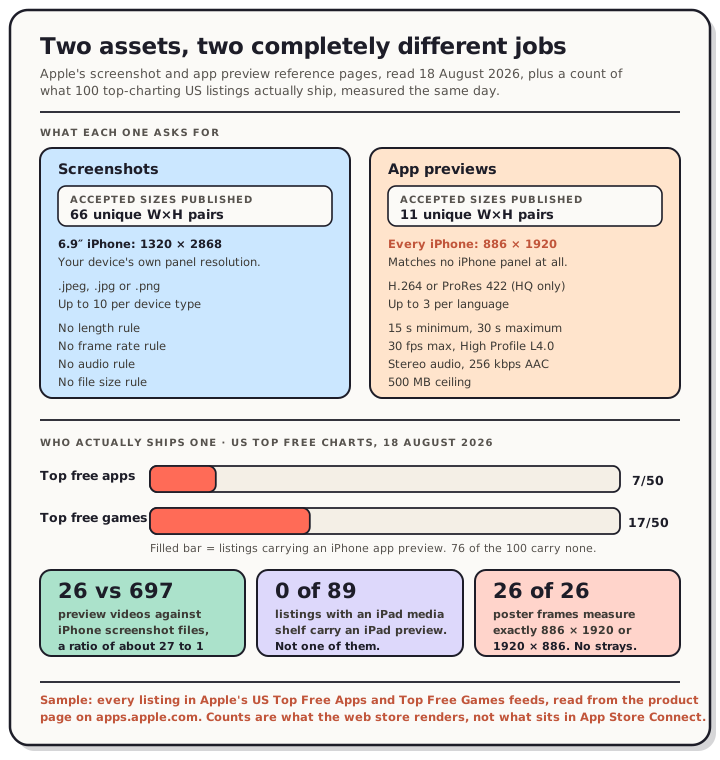
We measured 100 top-charting US listings on 18 August 2026. Twenty-four of them carry an app preview.
Read the chart description
Panel one compares what each asset demands, from Apple's own reference pages read 18 August 2026. Screenshots: 66 unique width by height pairs published, uploaded at the device's own panel resolution such as 1320 by 2868 for the 6.9 inch iPhone class, in JPEG or PNG, up to 10 per device type, with no length, frame rate, audio or file size rules. App previews: 11 unique accepted resolutions published across every platform, and the iPhone number of 886 by 1920 portrait or 1920 by 886 landscape matches no iPhone panel at all. Previews must be H.264 or ProRes 422 HQ only, run a minimum of 15 seconds and a maximum of 30, stay at or under 30 frames per second, stay within High Profile Level 4.0, carry stereo audio at 256 kilobits per second AAC, weigh 500 megabytes or less, and there can be at most 3 per language. Panel two shows prevalence measured on 18 August 2026 across Apple's United States top free charts. Of 50 top free apps, 7 carry an iPhone app preview and 43 do not. Of 50 top free games, 17 carry one and 33 do not. Across all 100 listings there were 26 preview videos against 697 iPhone screenshot files, a ratio of about 27 to 1. Eighty-nine of the listings expose an iPad media shelf and not one of them carries an iPad preview. Every one of the 26 poster frames Apple serves measures exactly 886 by 1920 or 1920 by 886.
The specs, side by side
Both numbers come from Apple's own reference pages, read 18 August 2026.
| Screenshots | App previews | |
|---|---|---|
| Unique accepted sizes published | 66 | 11 |
| iPhone 6.9" accepted | 1320 x 2868, 1290 x 2796, 1260 x 2736 | 886 x 1920 portrait, 1920 x 886 landscape |
| iPad 13" accepted | 2064 x 2752, 2048 x 2732 | 1200 x 1600 portrait, 1600 x 1200 landscape |
| Format | .jpeg, .jpg, .png | H.264 or ProRes 422 (HQ only) |
| Extensions | image files | .mov, .m4v, .mp4 (ProRes: .mov) |
| Length | n/a | "Minimum length 15 Seconds", "Maximum length 30 Seconds" |
| Frame rate | n/a | "Max frame rate 30 frames per second" |
| Encoding ceiling | n/a | "Progressive, up to High Profile Level 4.0" |
| Audio | n/a | Stereo, 256kbps AAC, 44.1kHz or 48kHz |
| File size | n/a | 500MB |
| How many | up to 10 | "up to 3 app previews" |
The count on the first row is ours: 66 unique width-by-height pairs appear on Apple's screenshot specifications page, against 11 on the app preview specifications page. Previews collapse a sprawling size matrix into a short list, which makes that part of the job easier than screenshots.
What is harder is that the short list doesn't line up with your hardware. Scale a 1290 x 2796 recording to 1920 tall and you get 885.84 wide, which rounds to Apple's 886. Do the same with 1320 x 2868 and you get 883.68. With 1260 x 2736 you get 884.21. Only one panel in the 6.9" class lands on the accepted number, and it isn't the newest one. Everything else needs a crop or a pad of a few pixels before it fits.
Note also the 3.5" row on Apple's page, which reads in full: "App previews aren't supported."
What the top 100 actually ship
Sample: the 50 entries in Apple's Top Free Apps feed and the 50 in the Top Free Games feed, US storefront, both read 18 August 2026. For each one we read the iPhone media shelf out of the product page on apps.apple.com and counted video items against screenshot items.
| Listings | With an iPhone preview | Preview videos | |
|---|---|---|---|
| Top free apps | 50 | 7 | 7 |
| Top free games | 50 | 17 | 19 |
| Total | 100 | 24 | 26 |
Those same 100 listings carry 697 iPhone screenshot files. So the ratio of screenshots to previews in the top charts is about 27 to 1.
Games use previews more than twice as often as apps, which matches what Google says on its own asset page: previews are "not required, but we highly recommend providing a preview video for games particularly." Even so, 33 of the 50 top free games ship no preview at all.
Three more things fell out of the count:
- Nobody uses all three slots. Apple allows three previews per language. Fortnite is the only listing in the 100 that uploads three. The other 23 upload exactly one.
- The iPad slot is empty across the board. Eighty-nine of the 100 listings expose an iPad media shelf. Zero of them carry an iPad preview.
- Every poster frame is spec-exact. All 26 previews serve a poster frame at exactly 886 x 1920 (21 of them) or 1920 x 886 (5 of them). Not one is off by a pixel.
That last one is a useful sanity check on the spec table. Apple's published accepted resolution and the artwork Apple actually serves are the same number.
This measures what the US product page on apps.apple.com renders. It is not a read of anyone's App Store Connect account, so a preview uploaded for a display class the web page doesn't render would not appear in our count.
What the store serves back
Each preview resolves to an HLS playlist. We pulled all 26 master playlists and read the variant ladders.
Every video variant across all 26 is avc1, which is H.264, paired with an mp4a audio track. No HEVC anywhere. The profile-and-level codes break down as level 3.1 (91 variants), level 4.0 (52), level 3.0 (26) and level 3.2 (18). Nothing exceeds level 4.0, which is exactly the ceiling Apple's spec names.
Durations, measured by summing segment lengths on the top variant of each: the shortest is 15.00 seconds and the longest 30.33, with a mean of 26.2. All 26 sit inside Apple's 15-to-30 window, the handful reading a fraction over 30 being segment arithmetic rather than a longer upload. Eighteen of the 26 run 28 seconds or more. If you make one of these, the field is telling you to make it long.
Ten of the 26 ladders top out at 886 x 1920 and three at 1920 x 886, so those are delivered at full accepted size. But eleven top out at 332 x 720, and two at 720 x 332. For those, the largest thing the web store will ever play is a 332-pixel-wide video. The bottom of every ladder is smaller still, down to 244 x 530.
We can't tell you why the ladders differ, and this is the web store rather than the App Store app on a phone, which may request something else. What we can say is that on apps.apple.com, exactly half of the 26 never render above 332 pixels wide. That is the same lesson our caption-size measurement found on the screenshot side, where a 1320-wide upload draws at 220 CSS pixels. Fine detail does not survive either pipeline.
The simulator route, and where it breaks
Apple documents the capture route on its app previews page: "Capture app footage from the device using QuickTime Player on macOS simply by connecting your device to a Mac." Most indie developers reach for the simulator instead, the same way they do for screenshots.
Measured on an iPhone 17 Pro Max simulator, iOS 26.5 runtime, Xcode 26.6 host, 18 August 2026:
xcrun simctl io booted recordVideo demo.mov
| What we probed | Default | With --codec=h264 |
|---|---|---|
| Codec | HEVC | H.264 |
| Profile / level | Main | High, level 5.0 |
| Dimensions | 1320 x 2868 | 1320 x 2868 |
| Audio streams | 0 | 0 |
Four gaps against the spec, and all four are fixable:
- The default codec is HEVC. Apple accepts H.264 and ProRes 422 (HQ only). Pass
--codec=h264or transcode. - 1320 x 2868 is not an accepted preview resolution. It's the accepted screenshot resolution. The preview needs 886 x 1920.
- H.264 comes out at High level 5.0, above the "up to High Profile Level 4.0" line in the spec. Re-encoding fixes it, and Apple's own delivery ladder never goes above 4.0 either.
- There is no audio track at all. Neither recording contains a single audio stream. Apple's table describes a stereo AAC track.
The recorder only writes frames when the screen changes
We recorded a static home screen for 17.8 seconds. The file reports a duration of 17.825 seconds and contains one video frame, at timestamp zero.
We recorded again while driving apps in and out for part of the capture. That file reports 21.881 seconds and holds 594 frames, but the last frame's timestamp is 11.765 seconds. The final ten seconds of the recording contain no new frames because nothing on screen changed.
Re-encode that 21.9-second recording to a constant 30 frames per second, which you have to do to hit Apple's spec, and the output is 11.776 seconds. Apple's minimum length is 15 seconds. A capture that looked like it comfortably cleared the floor lands under it, and nothing in the recording tells you so.
Keep something moving on screen for the entire capture, then check the output duration before you upload rather than trusting the number the recorder printed.
Getting from a recording to an accepted file
This is the transform we ran and verified, from a 1320 x 2868 simulator capture to a file matching every line of Apple's H.264 spec:
ffmpeg -i demo.mov -f lavfi -t 60 -i anullsrc=channel_layout=stereo:sample_rate=48000 \
  -map 0:v:0 -map 1:a:0 \
  -vf "fps=30,scale=886:-2,crop=886:1920" \
  -c:v libx264 -profile:v high -level:v 4.0 -pix_fmt yuv420p \
  -b:v 11M -maxrate 12M -bufsize 24M \
  -c:a aac -b:a 256k -shortest -movflags +faststart preview.mp4
Probing the output gives 886 x 1920, H.264 High level 4.0, 30 fps, stereo AAC at 48kHz. The crop is there because scaling 1320 x 2868 to 886 wide produces 1925 pixels of height, five more than the accepted 1920, so five rows come off. The silent stereo track is a placeholder. Apple's guidance is to think about audio properly, and previews autoplay muted anyway.
Google's side is a different job entirely
Play doesn't take a video file. From Google's graphic assets page, read 18 August 2026: "You can add one preview video to your store listing by entering a YouTube URL in the 'preview video' field."
That changes the work. There's no resolution table, no codec, no length ceiling. What Google publishes instead is a short list of requirements about the YouTube video itself:
- Ads must be off. "Turn off monetization in your video, or upload a different video without monetization claims."
- Privacy must be public or unlisted, never private.
- The video must not be age-restricted.
- It must be embeddable on Google Play.
And a longer list under "Highly recommended", which by Google's own labelling elsewhere on that page does not affect your listing: focus on the real experience "as early as possible within the first 10 seconds", aim for "at least 80% of the video" to be representative, keep it short because "only the first 30 seconds autoplays", and "Do not leave black bars on either side of a portrait video."
On Play the preview video does not get its own thumbnail. Google's page says the play button "overlays on your feature graphic", and that "if your preview video is available then your screenshots will be shown after the preview video." So on Play, the video's cover image is an asset you already had to make. We measured the feature graphic doing exactly this job in Play's search results, where it appeared on 21 of 30 cards and a screenshot appeared on none.
So where does the effort go
We won't tell you a preview lifts installs by some percentage. Neither store publishes that, we haven't run a controlled test, and anyone quoting you a number for it is guessing.
What the measurements do support:
- A preview is a bigger job than a screenshot set. It needs 15 to 30 seconds of footage that survives being played at 332 pixels wide with the sound off, plus a transform your capture tool won't do for you.
- Skipping it puts you with the majority, including 43 of the 50 highest-charting free apps in the US.
- If you do make one, make it long. The measured field clusters at the 30-second cap.
- On Apple your screenshots still carry the listing. Even the listings that ship a preview fill one slot of three, so everything after the first tile is a screenshot.
- On Play the video is a YouTube link and its cover image is your feature graphic, so the graphic earns the effort first.
Both stores require screenshots and show them everywhere, and you can finish a set today. Get the sizes right first: our App Store screenshot sizes and Google Play screenshot sizes pages carry every current accepted dimension.
FAQ
What size should an app preview video be? For every current iPhone, 886 x 1920 pixels portrait or 1920 x 886 landscape. For iPad, 1200 x 1600 or 1600 x 1200 (the 9.7" class takes 900 x 1200). Mac and Apple TV take 1920 x 1080, Apple Vision Pro takes 3840 x 2160. None of these are device screen sizes.
How long can an app preview be? Apple's spec sets a 15-second minimum and a 30-second maximum. Of the 26 previews we measured in the top 100, the shortest ran exactly 15.00 seconds and 18 ran 28 seconds or longer.
Can I use a simulator recording as an app preview? Not as it comes out. The default recording is HEVC at your device's screen resolution with no audio track, and Apple's spec asks for H.264 or ProRes at 886 x 1920 with stereo audio. Apple documents capturing from a real device with QuickTime Player. We haven't tested uploading a non-compliant file and neither store publishes what its validator does with one.
Do I need a preview video to publish? No, on either store. Apple lists previews as optional. Google says a preview video "is not required" while noting that a game "requires a preview video to be shown in certain parts of Google Play."
Does Google Play accept a video file? No. Play takes a YouTube URL, not an upload. That means ad settings, privacy and embeddability on the YouTube side become part of your store listing setup.
How many apps actually have one? In our 18 August 2026 read of Apple's US top free charts, 7 of 50 apps and 17 of 50 games. Twenty-four listings out of 100.
Screenshots are the part you can finish this afternoon. Open the editor, drop in your captures, and export every size both stores accept.