August 5, 2026 · 9 min read
The first three screenshots, and what search really shows
Apple shows your first one to three screenshots in search, but only sometimes. We measured 30 Google Play search cards: not one of them showed a screenshot.
On the App Store, your first one to three screenshots are the search result. Apple says so in writing, with conditions attached that most advice drops.
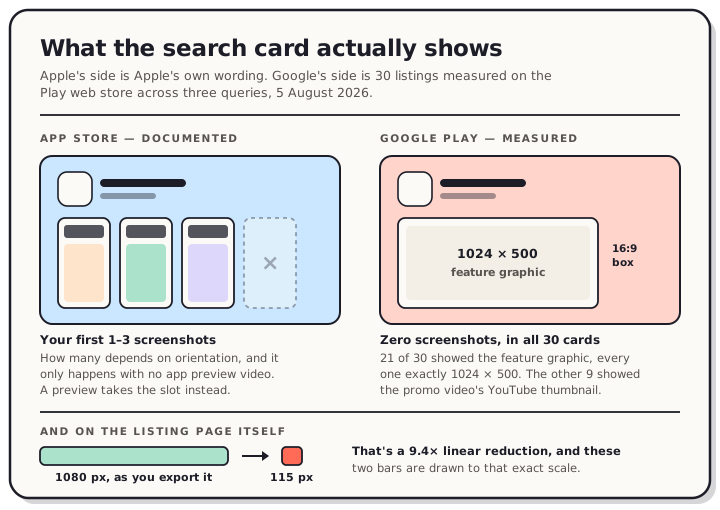
On Google Play, they aren't. We opened 30 listings on Play's web store this morning and measured every search card. Not one showed a screenshot. Twenty-one showed the 1024 × 500 feature graphic, every one of them exactly that size, and the other nine showed the promo video's thumbnail. The images are even labelled alt="Screenshot image" in the markup, which is how the assumption survives.
So the work you put into screenshot one lands somewhere different on each store, and on Play it may not land in search at all.
Read the chart description
Two panels comparing the App Store and Google Play search results card. On the App Store, Apple's own documentation says the first one to three screenshots appear in search results, that the count depends on the orientation of the screenshots, and that it only happens when the listing has no app preview video. On Google Play, thirty listings were measured on the web store on 5 August 2026 and not one search card showed a screenshot: twenty-one showed the 1024 by 500 feature graphic and nine showed the promo video's YouTube thumbnail, each rendered in a 16 by 9 box at 363 by 204 CSS pixels. A bottom strip shows that on the Play listing page a 1080 pixel wide screenshot is rendered 115 CSS pixels wide, a 9.4 times linear reduction.
What Apple actually promises
The sentence to know, from Apple's own product page guidance:
Depending on the orientation of your screenshots, the first one to three images will appear in search results when no app preview is available, so make sure these highlight the essence of your app.
That sentence has three qualifiers. The count is one to three, not three. It moves with orientation, so a landscape set gets fewer slots than a portrait one, and Apple doesn't publish the mapping. And it applies only when you have no app preview video, because the video takes that space when you have one.
You can upload up to 10 screenshots and up to three previews. Apple's guidance for everything after the search slots is a single line: focus each subsequent screenshot on a main benefit or feature. One more detail decides what people see when a video doesn't play, and Apple states it directly: preview poster frames appear whenever videos don't autoplay. Ship a preview and the poster frame becomes the still image doing the job your first screenshot used to do.
Every accepted screenshot size by display class is in our App Store screenshot sizes reference.
What Google Play's search card actually shows
Here's how we looked, so you can repeat it. On 5 August 2026 we ran three unrelated searches on the Play web store, "habit tracker", "photo editor" and "puzzle game", and took the first ten app results from each. For every result we read the card image's URL, then fetched that image at its original size and measured it.
Play requests the card image in a 16:9 box, =w416-h235, and renders it at 363 × 204 CSS pixels on a desktop viewport. At a 375-pixel-wide mobile viewport it's the same request and 327 × 184 rendered. The layout changes, the asset doesn't.
| Query | Feature graphic | Promo video thumbnail |
|---|---|---|
| habit tracker | 10 | 0 |
| photo editor | 6 | 4 |
| puzzle game | 5 | 5 |
| Total | 21 | 9 |
All 21 feature graphics measured exactly 1024 × 500 at full size. Not one was off by a pixel, which is what you'd expect from an asset whose dimensions the store enforces. The nine video cards were served from YouTube as that video's thumbnail.
Google documents part of this. Their listing-assets page says you must provide a feature graphic to publish your store listing, that it's 1024 × 500, and that it's "displayed in various places on Google Play". It also says a preview video may be displayed on both the home and search page. What it doesn't say is that the search card is one of those various places, which is the bit we measured.
We've already mapped where the feature graphic gets cropped, and the full Play asset rules are on the Google Play screenshot sizes reference. The short version: it's required, it's the first thing a Play searcher sees, and it's the easiest asset on the listing to leave until the night before you submit.
The size your work gets seen at
Screenshots do appear on the Play listing page. They're smaller there than most people design for.
Loop Habit Tracker's screenshots are 1080 × 1920 files. Play requests them at =w526-h296, which returns a 166 × 296 image, and renders them 115 CSS pixels wide. We measured the same 115 on a mobile viewport and 114 on a desktop one, so the height is pinned and the viewport barely matters.
From 1080 pixels to 115 is a 9.4× linear reduction, so the area shrinks by about 88 times.
That number is the whole argument for short captions. Text around 60 pixels tall on a 1080-pixel canvas lands near 6 CSS pixels in that strip. You can see there's writing. You can't read it. Three big words in the same slot survive, because at that scale they still have shape.
The detail isn't wasted, though. People who tap through see the screenshot large, and that's where a second line of smaller text earns its place. One image is serving two audiences, and the thumbnail audience gets first call.
What to do with slots one to three
On the App Store, the practical order:
- Decide the preview question first. A preview video replaces your screenshot slots in search. If you ship one, the poster frame is now your search card, and screenshot one becomes a page asset rather than a search asset.
- Make image one answer "what is this". When we tore down ten top listings, seven gave the first screenshot a different job from the rest: a plain uncaptioned shot, a branded title card, or a normal shot with the wordmark added. Image one says what the app is, images two onward say what it does.
- Assume the landscape penalty. Apple ties the count to orientation without publishing the mapping, and every set in our teardown sample was portrait. Portrait is the safe default.
- Write for the small size. Put the caption up top. We later measured the product page and found nothing is cropped there, so the whole image is scaled and shown. Apple's search card is laid out differently and we haven't been able to measure it, so top-weighting stays the safer habit rather than a proven one.
On Google Play, the order is different, and it's shorter:
- The feature graphic is your search card. It was the asset in 21 of our 30 cards, and Google requires it before you can publish. You're making one either way, so the only real decision is how much thought goes into it.
- A promo video overrides it. Nine of our thirty cards were video thumbnails, and the split tracks category: zero of ten in habit trackers, five of ten in puzzle games. Games ship videos, utilities often don't.
- Then the screenshots, which do their work on the listing page at about 115 pixels wide.
One caution carried over from the feature graphic post: Google bans ranking, award and price claims on the feature graphic. An award laurel is fine on an App Store screenshot and not fine on the Play graphic, so the same app needs two different top assets.
What this doesn't prove
Some limits, stated plainly.
We measured the Play web store, not the Play app on an Android phone. The Play app requires a Google sign-in we didn't do, so we can't tell you whether its search card behaves the same. Treat the finding as "Play's web search card", not "Play everywhere".
It's 30 listings, three queries, one day, US English. It's a consistent result with no exceptions, which is a good sign, but it's not a census.
And we didn't measure Apple's search card at all. Everything on the Apple side of this post is Apple's documented wording, not our observation. Apple's phrasing is unusually specific about the conditions, which is why it's quotable, but we can't tell you what the card looks like at what size.
Frequently asked questions
How many App Store screenshots show in search results? One to three, depending on the orientation of your screenshots, and only when your listing has no app preview video. Apple doesn't publish which orientation earns which count. Upload a preview and it takes the slot instead.
Do Google Play screenshots appear in search results? Not in the 30 web search cards we measured on 5 August 2026. Every card showed either the 1024 × 500 feature graphic or the promo video's thumbnail. Your screenshots appear once someone opens the listing.
What image does Google Play show in search? The feature graphic, at 1024 × 500, fitted into a 16:9 box and rendered 363 × 204 CSS pixels on desktop. If the listing has a promo video, the video's thumbnail takes that spot.
Is a feature graphic required on Google Play? Yes. Google's own wording is that you must provide one to publish your store listing. Given it's also what search shows, it's the asset most worth your time on a Play listing.
How big are Play listing screenshots on screen? About 115 CSS pixels wide. We measured a 1080 × 1920 screenshot rendering at 115 × 204, on both a mobile and a desktop viewport. That's a 9.4× reduction from the file you upload.
Should my first screenshot have a caption? Usually, and a short one. Seven of the ten top listings we tore down treat image one differently from the rest, and two of those drop the caption entirely so the app speaks for itself. Either works. A long sentence doesn't.
Does a preview video help or hurt? On both stores it replaces the still image in search, so it's a trade rather than an addition. Ship one when the app is easier to show moving than still, and make sure the poster frame or thumbnail stands on its own.
Each store has a different asset out front, and both of them come from the same set of captures. In the QuickScreens editor you compose the Apple sizes and the Play sizes from one project, including the 1024 × 500 feature graphic that turns out to be doing the most work on Play. One-time $25, no subscription.