August 17, 2026 · 12 min read
Play Store tablet and Chromebook screenshots, measured
Google publishes different screenshot rules for large screens than for phones. We read 91 top listings and 1,412 files to see what developers actually upload.
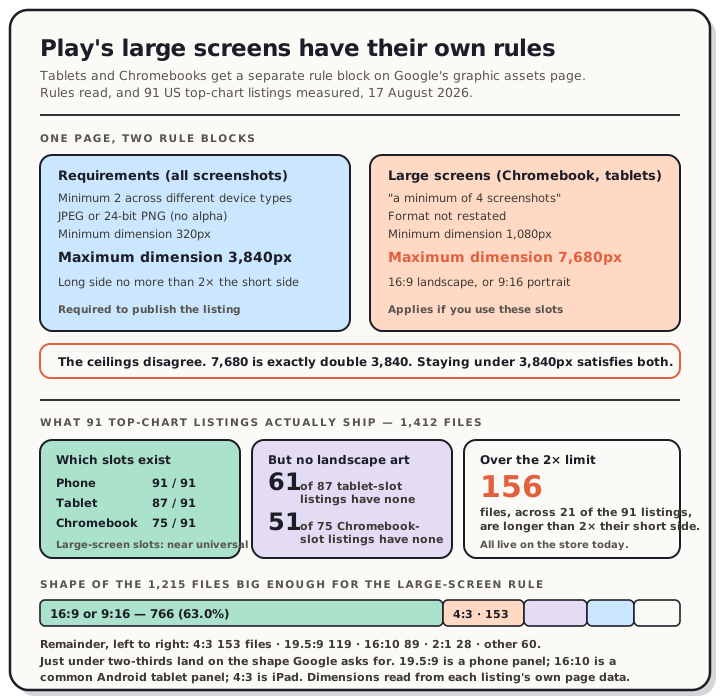
Google Play gives tablets and Chromebooks their own screenshot slots, and their own rules. The large-screen block on Google's graphic assets page asks for a minimum of 4 screenshots, files "between 1,080 and 7,680px", and "a 16:9 aspect ratio for landscape and a 9:16 aspect ratio for portrait."
The general requirements on the same page say something different: minimum 320px, maximum 3,840px, and "the maximum dimension of your screenshot can't be more than twice as long as the minimum dimension."
Both blocks are live on the same page, read 17 August 2026. The large-screen ceiling is exactly double the general one.
Read the chart description
Panel one compares the two rule blocks Google publishes on one page, read 17 August 2026. The general Requirements block: a minimum of two screenshots across different device types to publish, JPEG or 24-bit PNG with no alpha, minimum dimension 320 pixels, maximum dimension 3,840 pixels, and the maximum dimension no more than twice the minimum dimension. The Large screens block, covering Chromebook and tablets: a minimum of 4 screenshots, upload between 1,080 and 7,680 pixels, and a 16:9 aspect ratio for landscape or 9:16 for portrait. The two ceilings disagree, 3,840 against 7,680, which is exactly double. Panel two shows what 91 apps from Google Play's United States top charts ship, measured the same day across 1,412 screenshot files. Every one of the 91 has a phone slot, 87 have a tablet slot and 75 have a Chromebook slot, so the large screen slots are close to universal. Of the 87 listings with a tablet slot, 61 carry no landscape file anywhere in their media set, and of the 75 with a Chromebook slot, 51 carry none. Among the 1,215 files large enough for the large screen rule, 766 are exactly 16:9 or 9:16, 153 are 4:3, 119 are 19.5:9, 89 are 16:10, 28 are 2:1 and 60 are other shapes. Separately, 156 files across 21 of the 91 listings are more than twice as long as they are wide, which the general Requirements block does not allow.
The two rule blocks
Here they are side by side, quoted from Google's graphic assets page:
| General requirements | Large screens (Chromebook and tablets) | |
|---|---|---|
| Count | "a minimum of two screenshots across different device types" | "a minimum of 4 screenshots" |
| Smallest side | 320px | 1,080px |
| Largest side | 3,840px | 7,680px |
| Shape | max side ≤ 2 × min side | "16:9 aspect ratio for landscape and a 9:16 aspect ratio for portrait" |
| Format | "JPEG or 24-bit PNG (no alpha)" | not restated |
The shape rules aren't in conflict, they're just different in kind. 16:9 is 1.778, comfortably inside the 2× limit, so anything that satisfies the large-screen block satisfies the general one. The ceilings are the odd part. If you upload a 5,000px tablet screenshot you've followed one sentence on the page and broken another.
We haven't tested an upload at 7,680px, and we won't guess which sentence Play Console enforces. Neither store publishes that. What we can say is that the page contradicts itself, and that staying under 3,840px keeps you inside both.
The other line worth reading twice is the one about text. Google asks you to "exclude additional text that is not part of your core app experience, as this can get cut off on Play homepages on certain screen sizes." That's a layout warning, not a policy, and it applies specifically to the large-screen slots.
Which apps actually have these slots
Play's web listing shows a row of device-type chips above the screenshots. We read all 91 app listings linked from Play's US top charts page on 17 August 2026 and recorded which chips each one has.
| Device type | Listings with that slot |
|---|---|
| Phone | 91 of 91 |
| Tablet | 87 of 91 |
| Chromebook | 75 of 91 |
| Watch | 8 of 91 |
| TV | 6 of 91 |
| Car | 6 of 91 |
| XR headset | 4 of 91 |
So the large-screen slots aren't a niche concern. Nearly every app in the sample has a tablet slot, and five out of six have a Chromebook slot.
One thing we could not measure is which specific files sit behind each chip. The chips filter a single strip of images client-side, and Play's own click handlers didn't respond to scripted clicks, so any per-chip attribution we made would have been inference dressed up as measurement. We're leaving that gap open rather than filling it with a guess.
What we could measure is every screenshot file each listing carries, with its original dimensions, read from the listing's own page data and spot-checked against the real files. That's 1,412 files.
What's in them
Of those 1,412 files, 1,100 are portrait, 263 are landscape and 49 are square.
Now filter to files big enough for the large-screen block, meaning a smallest side of at least 1,080px. That's 1,215 files. Here's what shape they are:
| Aspect ratio | Files | Share |
|---|---|---|
| 16:9 or 9:16 | 766 | 63.0% |
| 4:3 | 153 | 12.6% |
| 19.5:9 | 119 | 9.8% |
| 16:10 | 89 | 7.3% |
| 2:1 | 28 | 2.3% |
| everything else | 60 | 4.9% |
Just under two-thirds land on the shape Google asks for. The rest are mostly phone-shaped (19.5:9 is a modern phone panel) or tablet-panel-shaped (16:10 is what a lot of real Android tablets are, and 4:3 is iPad).
The orientation split says more. Of the 87 listings with a tablet slot, 61 carry no landscape file anywhere in their media set. Of the 75 with a Chromebook slot, 51 carry none. That isn't a rule violation, because Google accepts 9:16 portrait for large screens too. But a Chromebook is a laptop. Every one of those 51 listings is presenting a laptop app with portrait artwork.
The Apple sizes hiding on Google Play
While tallying dimensions, one group kept reappearing: files that land exactly on an Apple slot.
| Size | Apple's slot | Files on Play |
|---|---|---|
| 1242 × 2208 | iPhone 5.5" | 129 |
| 1242 × 2688 | iPhone 6.5" | 62 |
| 2048 × 2732 | iPad 12.9" portrait | 50 |
| 1290 × 2796 | iPhone 6.7" / 6.9" | 43 |
| 2732 × 2048 | iPad 12.9" landscape | 33 |
| 2752 × 2064 | iPad 13" landscape | 30 |
| 2064 × 2752 | iPad 13" portrait | 24 |
| 1320 × 2868 | iPhone 6.9" | 15 |
That's 386 files across 35 of the 91 listings sitting on a dimension Apple accepts. We can't see anyone's export settings, so we won't claim these were made for the App Store and reused. What we can say is that a third of the sample ships Play screenshots cut to Apple's measurements, and that the iPad ones are landing in the large-screen slots, where Google asked for 16:9 and got 4:3.
There's a second thing to check if you're moving files between stores, and it has nothing to do with shape. Both stores exclude alpha, and iPad-shaped files usually come out of a design tool rather than off a device. Our Figma export post covers why that particular tool can't write a store-legal PNG at all.
The rule 21 apps break
Google's general requirements say the long side can't be more than twice the short side. Across the 1,412 files, 156 exceed that, spread over 21 of the 91 listings.
The offenders are ordinary modern phone shapes:
| Size | Ratio | Over by |
|---|---|---|
| 1290 × 2796 | 2.167 | 216px |
| 1344 × 2992 | 2.226 | 304px |
| 1242 × 2688 | 2.164 | 204px |
| 738 × 1600 | 2.168 | 124px |
None of them are anywhere near the 3,840px ceiling. They're just tall. This is the same arithmetic we hit measuring Flutter emulator captures, where a 1080 × 2400 capture came in 240px over the limit, and it's a property of phone panels rather than of any particular tool. Note that 1290 × 2796 is Apple's 6.7-inch size, so a file that's perfectly legal on the App Store is out of spec on Play.
As with every measurement in this series: these files are live on Google Play right now, which means Play Console accepted them. We're describing a gap between Google's published rule and what's on the store, not predicting a rejection.
What a tablet emulator actually writes
We booted an Android tablet AVD on this Mac (API 36 Play Store image, 1440 × 2560 at 320 dpi) and captured it with adb exec-out screencap -p in both orientations.
| Orientation | File written | Ratio |
|---|---|---|
| Portrait | 1440 × 2560 | exactly 9:16 |
| Landscape | 2560 × 1440 | exactly 16:9 |
Both land on Google's requested large-screen shape, both sit inside 1,080–7,680 and inside 320–3,840, and both pass the 2× rule. On shape and size, a straight capture from this configuration is already compliant.
On format it isn't. Both files came back as 8-bit/color RGBA, and decoding the alpha channel gives a single bucket: all 3,686,400 pixels at alpha 255. The transparency is invisible and completely useless, but it's in the file, and Google asks for "24-bit PNG (no alpha)". That's the same trap we measured on the iPhone simulator, on Android phone emulators and on iPad simulators, now confirmed on an Android tablet. Four platforms, same result.
Check yours before uploading:
file screenshot.png
If it says RGBA, strip the channel. On macOS, sips -s format jpeg works. With ImageMagick, -alpha remove -alpha off -define png:color-type=2 keeps it a PNG.
Worth being precise about the scope of that. It's one emulator configuration rather than a survey of tablet hardware, and plenty of real Android tablets are 16:10. A 16:10 panel captured straight gives you a 1.6 ratio, which passes the 2× rule and misses Google's 16:9 ask. The shape you upload is a composition decision. The capture won't make it for you.
How to think about the large-screen slots
Three things follow from the measurements above.
Fill the slot with four. That's the large-screen minimum. If you're using these slots at all, use them properly.
Pick the orientation deliberately. Portrait is allowed. But 51 listings with a Chromebook slot have no landscape artwork at all, so a landscape Chromebook set is an easy way to look considered on a surface where almost nobody bothers.
Stay under 3,840px. It satisfies both of Google's ceilings and no large-screen slot needs more.
If you want the canvas set out for you, our Google Play screenshot sizes page carries every required asset with dimensions, and the editor has both stores' presets built in so you can export a 16:9 large-screen set and a 9:16 phone set from the same source captures.
FAQ
What size should Play Store tablet screenshots be? Google doesn't publish a pixel size for the tablet slot the way Apple publishes one per iPad class. It publishes a range and a shape: between 1,080 and 7,680px, at 16:9 for landscape or 9:16 for portrait. 1920 × 1080 and 1080 × 1920 both satisfy that, and 2560 × 1440 does too. Stay at or below 3,840px on the long side so you also satisfy the general 3,840px maximum on the same page.
Are Chromebook screenshots separate from tablet screenshots? They're separate slots in Play Console, and Play's web listing shows them as separate chips. Google's rules for the two are written as one block, so the sizes and shapes are identical. In our 91-listing sample, 87 had a tablet slot and 75 had a Chromebook slot.
Do I have to upload tablet screenshots? No. Google's publishing requirement is "a minimum of two screenshots across different device types". The 4-screenshot minimum applies to the large-screen slots if you use them. Skipping them is allowed, and 4 of the 91 listings we read had a phone slot only.
Will Play reject a tablet screenshot that isn't 16:9? We don't know, and we won't guess. Neither Apple nor Google publishes rejection statistics, and we haven't tested a non-compliant upload. What we can say is that 449 of the 1,215 large-screen-eligible files we measured are not 16:9 or 9:16 and they're all live on the store today.
Can I reuse my App Store screenshots on Play? Dimension-wise, sometimes. 386 files across 35 of the 91 listings we read sit exactly on an Apple size. But watch the 2× rule: Apple's 1290 × 2796 and 1242 × 2688 both exceed Google's stated maximum ratio. And strip the alpha channel either way, since both stores exclude it.
Method
Google's graphic assets page (answer/9866151) was fetched as raw HTML on 17 August 2026 and flattened to text before quoting, rather than read through a summariser. Every quoted sentence is verbatim from that parse.
The 91 listings are every app linked from play.google.com/store/apps/top for the US storefront, read the same day in document order, with no filtering by us. Device-type chips were read from each listing's rendered markup. Screenshot dimensions came from each listing's own embedded page data; that data stores dimensions as height-then-width, which we confirmed by fetching sample files at full size and by cross-checking against Google's documented Android Automotive sizes (800 × 1,280 portrait and 1,024 × 768 landscape) appearing in the expected orientation. An earlier pass of this analysis had the axes swapped and was rebuilt.
The emulator capture used an Android tablet AVD on the android-36 Play Store image at 1440 × 2560, 320 dpi, captured with adb exec-out screencap -p and measured with file and a per-pixel alpha histogram.
Two things we did not measure, stated plainly: which files sit behind each device-type chip, and what any real Chromebook or tablet hardware captures. Both would need a device or a Play Console we don't have.