August 13, 2026 · 12 min read
Apple Watch and iPad screenshot sizes, measured
We booted 11 iPad simulators and read 25 listings. Three iPads capture at a size Apple accepts nowhere, and nobody uploads the newest Watch size.
If your app runs on iPad, Apple requires 13-inch screenshots: 2064 × 2752 or 2048 × 2732 in portrait, or those two flipped for landscape. If it has a Watch app, Apple requires one of six Watch sizes, and you have to use the same one across every localization.
That's the whole rule, and it's short. The capture step is where it breaks. We booted 11 iPad simulators on this Mac and measured what each one writes to disk. Eight land exactly on a size Apple accepts. Three land on 1620 × 2160, which appears nowhere in Apple's specification, in either orientation.
Those three are the iPad 7th, 8th and 9th generation, the entry-level models.
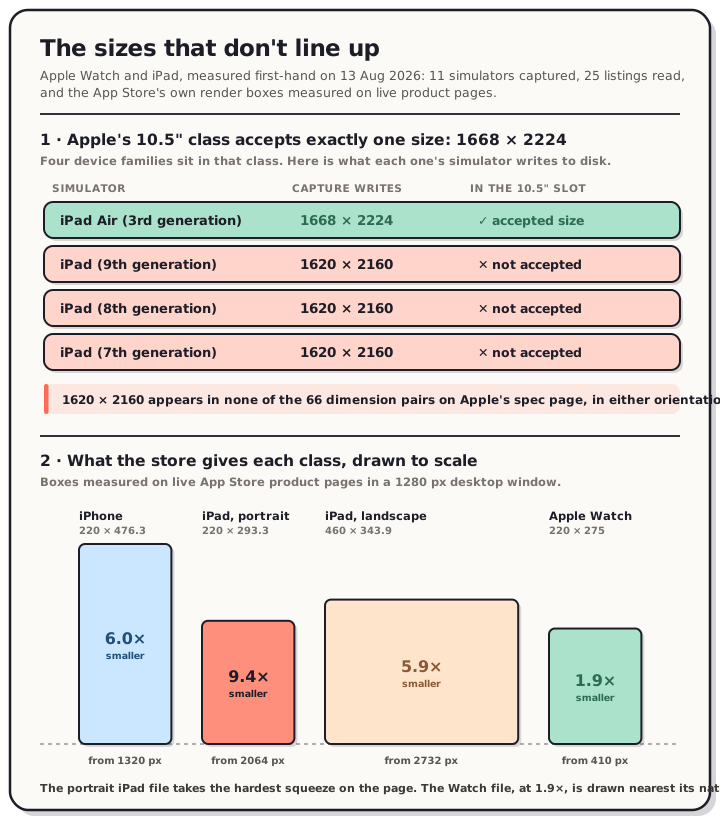
Read the chart description
Two panels of first-hand measurements taken on 13 August 2026. Panel one covers Apple's 10.5-inch iPad display class, which accepts exactly one screenshot size, 1668 by 2224 pixels. Four simulators were booted and captured. The iPad Air 3rd generation writes 1668 by 2224 pixels, which matches the accepted size. The iPad 9th generation, iPad 8th generation and iPad 7th generation all write 1620 by 2160 pixels, which is 48 pixels narrower and 64 pixels shorter than the accepted size and appears nowhere in Apple's specification in either orientation. Panel two shows the boxes the App Store product page draws each class in, measured in a 1280 pixel desktop window and drawn here to the same scale. An iPhone screenshot is drawn 220 by 476.3 CSS pixels, a 6 times linear reduction from a 1320 pixel wide upload. A portrait iPad screenshot is drawn 220 by 293.3, a 9.4 times reduction from a 2064 pixel upload, the largest reduction measured. A landscape iPad screenshot is drawn 460 by 343.9, a 5.9 times reduction from a 2732 pixel upload. An Apple Watch screenshot is drawn 220 by 275, a reduction of only 1.9 times from a 410 pixel upload, so the Watch asset is displayed closest to its native size.
The iPad that captures a size Apple won't take
Apple groups iPads into display classes and lists the accepted screenshot sizes per class. The 10.5-inch class covers four device families and accepts exactly one size: 1668 × 2224 portrait, 2224 × 1668 landscape.
Every row below is a real simulator, booted and screenshotted on 13 August 2026:
| Simulator | Capture writes | Apple's class | Accepted? |
|---|---|---|---|
| iPad Air (3rd generation) | 1668 × 2224 | 10.5" | Yes |
| iPad (9th generation) | 1620 × 2160 | 10.5" | No |
| iPad (8th generation) | 1620 × 2160 | 10.5" | No |
| iPad (7th generation) | 1620 × 2160 | 10.5" | No |
Three of the four families in that class produce a file the class doesn't accept. It isn't a rounding problem either. The capture is 48 pixels narrower and 64 pixels shorter than the only size that slot takes.
We checked 1620 × 2160 against every dimension pair on Apple's specification page, all 66 of them, in both orientations. It isn't there. Not in the 10.5-inch class, not in the 9.7-inch class, not anywhere.
The rest of the catalogue behaves:
| Simulator | Capture writes | Apple's class |
|---|---|---|
| iPad Pro 13-inch (M4) | 2064 × 2752 | 13", the required size |
| iPad Pro 12.9-inch (6th gen) | 2048 × 2732 | 13" and 12.9" |
| iPad Pro 11-inch (M4) | 1668 × 2420 | 11" |
| iPad Air 11-inch (M3) | 1640 × 2360 | 11" |
| iPad (A16) | 1640 × 2360 | 11" |
| iPad (10th generation) | 1640 × 2360 | 11" |
| iPad mini (A17 Pro) | 1488 × 2266 | 11" |
So the trap is narrow and specific. Buy a base iPad, capture your app on it, and the file you hold can't be uploaded as-is to any iPad slot.
You never needed to upload it, though. Only the 13-inch size is required for iPad, and Apple fills the rest in: the 12.9-inch slot scales from 13-inch, the 10.5-inch slot scales from 12.9-inch, and the 9.7-inch slot scales from 10.5-inch. It's a chain, and the only link you have to supply is the top one. Design at 2064 × 2752 and the other four classes take care of themselves.
There's a second thing in those files worth knowing. All 11 captures came back as 8-bit RGBA PNGs, and decoding the alpha channel showed every pixel at 255. The transparency is invisible but present, and both stores exclude alpha from screenshots. That's the same trap we found on the iPhone simulator and on Android emulators, now confirmed on iPad. Strip it before upload.
Nobody uploads the newest Watch size
Apple accepts six Apple Watch screenshot sizes and makes you pick one. We wanted to know which one real apps pick, so we read the media shelves on 25 App Store listings. Seventeen of them ship a Watch app.
| Watch size | Apple's devices | Apps using it |
|---|---|---|
| 422 × 514 | Ultra 3 | 0 |
| 416 × 496 | Series 11, Series 10 | 2 |
| 410 × 502 | Ultra 2, Ultra | 2 |
| 396 × 484 | Series 9, 8, 7 | 6 |
| 368 × 448 | Series 6, 5, 4, SE 3, SE | 3 |
| 312 × 390 | Series 3 | 4 |
Not one listing in the sample uses 422 × 514, the newest size. Four of seventeen still use 312 × 390, which is the Apple Watch Series 3 size, and the Series 3 has been out of production for years. Bear, Nike Run Club, MyFitnessPal and Citymapper are all still on it.
There's a good reason for that. Apple's rule is that you pick a size and stay on it, so a Watch screenshot set built in 2019 keeps working, and there's no prompt anywhere telling you a newer size exists. The size you chose the first time is the size you still have.
Every one of the seventeen used exactly one distinct size across its whole Watch shelf, which is Apple's consistency rule showing up in the data.
Every iPad listing uses a 13-inch size
The same 25 listings gave us 19 iPad shelves, and the pattern there is cleaner than we expected.
| Uploaded size | Orientation | Apps |
|---|---|---|
| 2732 × 2048 | Landscape | 8 |
| 2048 × 2732 | Portrait | 6 |
| 2752 × 2064 | Landscape | 3 |
| 2064 × 2752 | Portrait | 2 |
All 19 are 13-inch class sizes. Not one app in the sample uploads an 11-inch, 10.5-inch or 9.7-inch set. The scaling chain works, and everybody relies on it.
Two smaller things fall out. Fourteen of the nineteen use the older 2048 × 2732 pair rather than 2064 × 2752, which is fine because the 13-inch class accepts both. And iPad skews landscape, 11 to 8, while all 25 iPhone shelves in the same sample were portrait without exception. If you've been building iPad screenshots portrait because that's how you build iPhone ones, most of our sample went the other way.
The store draws them at wildly different sizes
We measured the box the App Store draws an iPhone screenshot in a week ago: 220 CSS pixels wide on a 1280-pixel desktop window. We ran the same measurement on the iPad and Watch shelves, on two different listings, on 13 August 2026.
| Class | 375 px window | 1280 px window |
|---|---|---|
| iPhone, portrait | 144 × 311.8 | 220 × 476.3 |
| iPad, portrait | 298 × 397.3 | 220 × 293.3 |
| iPad, landscape | 298 × 222.8 | 460 × 343.9 |
| Apple Watch | 144 × 180.0 | 220 × 275.0 |
The iPhone numbers reproduce that earlier measurement to the decimal, which is a useful check that nothing about the method drifted.
Now turn those into reduction factors against a typical upload:
| Class | Upload | Desktop | Mobile web |
|---|---|---|---|
| iPhone | 1320 wide | 6.0× smaller | 9.2× smaller |
| iPad, portrait | 2064 wide | 9.4× smaller | 6.9× smaller |
| iPad, landscape | 2732 wide | 5.9× smaller | 9.2× smaller |
| Apple Watch | 410 wide | 1.9× smaller | 2.8× smaller |
A portrait iPad screenshot takes the hardest reduction we measured anywhere on the product page. You upload 2064 pixels of width and the desktop store draws 220 of them, which is a 9.4× squeeze. The Watch file goes the other way: a 410-pixel upload is shown 220 pixels wide, close to pixel-for-pixel. The asset most people treat as an afterthought is the one displayed nearest its native size.
The Watch box is fixed, by the way. It measured 220 × 275 on both listings we checked, even though one uploads 410 × 502 and the other uploads 416 × 496. Same box, different files, exactly like the iPhone box. Apple's layout decides the display size, not your upload.
One more oddity. A portrait iPad screenshot is drawn larger on a phone than on a desktop, 298 pixels against 220. Mobile web gives it a full-width row, while desktop puts it in a carousel column the same width as the iPhone one.
What to do about it
- Design iPad at 2064 × 2752 and let Apple scale the rest. It's the only iPad size you're required to provide.
- Consider landscape for iPad. Most of our sample did, and the landscape box is more than twice the width of the portrait one on desktop.
- Check which Watch size you're on. If your Watch screenshots are 312 × 390 or 368 × 448, they were probably set years ago and nothing has prompted you since.
- Don't capture on a base iPad and expect the file to be uploadable. Capture on a 13-inch simulator, or compose at 2064 × 2752.
- Strip the alpha channel from any simulator capture before upload.
- Put less text on iPad. At a 9.4× reduction, a caption sized for an iPhone screenshot is smaller here than it looks in your design tool.
Frequently asked questions
What size are Apple Watch screenshots? One of six: 422 × 514 (Ultra 3), 410 × 502 (Ultra 2 and Ultra), 416 × 496 (Series 11 and 10), 396 × 484 (Series 9, 8 and 7), 368 × 448 (Series 6, 5, 4, SE 3 and SE), or 312 × 390 (Series 3). Pick one and use that same size across every localization of your app, which is Apple's own requirement.
What size are iPad screenshots? 2064 × 2752 or 2048 × 2732 portrait, or 2752 × 2064 and 2732 × 2048 landscape. That's the 13-inch class, and it's required if your app runs on iPad. Every other iPad size is optional and gets scaled from what you provide.
Do I need to upload 11-inch or 10.5-inch iPad screenshots? No. All 19 iPad listings we measured skip them entirely. Apple scales the 12.9-inch slot from your 13-inch set, the 10.5-inch slot from 12.9-inch, and the 9.7-inch slot from 10.5-inch.
Will Apple reject a 1620 × 2160 screenshot? We don't know and we won't guess. What we can say is that the size isn't listed anywhere in Apple's screenshot specification, in either orientation. We haven't tested an upload.
Should iPad screenshots be portrait or landscape? Landscape led our sample 11 to 8. There's no rule either way, and both are accepted. If your app is genuinely a landscape experience on iPad, the store's landscape box is also considerably wider on desktop.
Do Apple Watch screenshots need a device frame? Apple doesn't require one for Watch on the App Store. Google Play takes the opposite position for Wear OS and tells you not to position screenshots inside device frames at all, which we covered in the piece on 3D device mockups.
Method
Eleven iPad simulators were created and booted on this Mac on 13 August 2026, on the iOS 26.5 runtime except the iPad 7th generation, which isn't supported there and ran on iOS 18.5. Each was captured with xcrun simctl io <device> screenshot and measured with sips and file. The alpha channel was decoded separately to confirm every pixel sat at 255. The iPad Pro 10.5-inch is the fourth family in the 10.5-inch class and we couldn't measure it: CoreSimulator refused to create it on either installed runtime, so it's absent from the table rather than assumed.
Apple's accepted sizes come from the raw HTML of the App Store Connect screenshot specifications page, pulled and parsed on 13 August 2026 rather than read from a summary, because a summarised fetch of that page has given us contradictory answers before.
The listing tally covers 25 US App Store listings read the same day: Things 3, Flighty, Streaks, CARROT Weather, Overcast, Strava, Todoist, Bear, Fantastical, Dark Noise, AutoSleep, WaterMinder, Nike Run Club, MyFitnessPal, Spotify, Shazam, Citymapper, Deliveries, Duolingo, Notion, Procreate Pocket, Canva, Slack, Halide and Pillow. Upload dimensions were read from each product page's own JSON payload, which labels its media shelves per platform. We used Apple's public search API only to resolve app identifiers, never to read screenshot sets, because that API has previously served us a different set from the one the product page renders.
Twenty-five listings is a sample, not a census, and it leans toward productivity, health and fitness apps, which is where Watch apps concentrate. It describes what apps that ship a Watch or iPad build are doing. It can't tell you what the whole store does.
Render boxes were measured with getBoundingClientRect on the live product pages for Streaks and Fantastical at 375 and 1280 pixel viewport widths. Those two were chosen because between them they cover portrait iPad, landscape iPad and two different Watch upload sizes.
The sizes themselves aren't hard. Producing four canvases at four different aspect ratios, then keeping them in sync when the copy changes, is the part that eats an afternoon. In the QuickScreens editor the iPhone, iPad and Watch canvases share one layout and export together at every size the store accepts, alpha already stripped. One-time $25, no subscription. The full size tables live on our App Store screenshot sizes reference.