August 3, 2026 · 9 min read
Flutter apps: store screenshots without a designer
We measured what flutter screenshot writes on three Android emulators. Two of the three produce a file outside what Google Play's own rules allow.
Flutter gives you one codebase and two stores that agree on almost nothing about screenshots. The default capture satisfies neither. Apple checks exact pixel dimensions, Google checks a range, an aspect ratio and a file format, and the capture step looks identical on both sides. That's why this one catches people.
We measured it rather than assuming. Three Android emulators, API 36, captured with the same command flutter screenshot runs internally. All three wrote a PNG with an alpha channel, which Google's spec rules out. Two of the three wrote an image too tall for Google's aspect-ratio limit, before anyone had made a single design decision.
Read the chart description
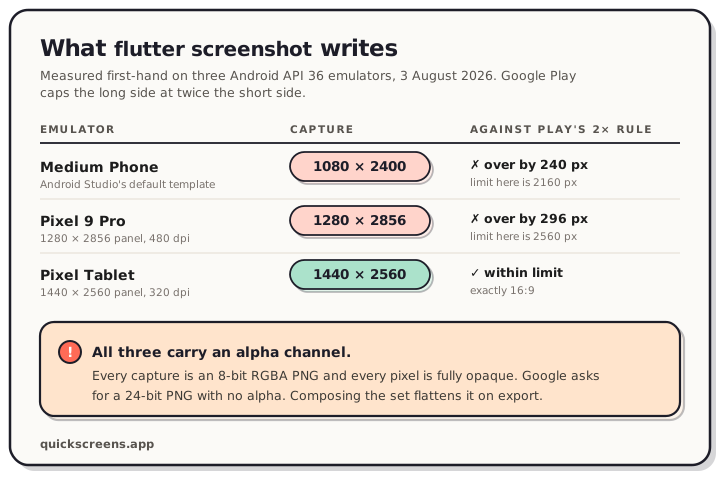
Capture dimensions measured on three Android API 36 emulators, 3 August 2026, and whether each one satisfies Google Play's rule that the long side cannot exceed twice the short side. Medium Phone writes 1080 by 2400 pixels, which is 240 pixels over its 2160 pixel limit. Pixel 9 Pro writes 1280 by 2856, which is 296 pixels over its 2560 pixel limit. Pixel Tablet writes 1440 by 2560, exactly 16 by 9 and within its 2880 pixel limit. All three are RGBA PNGs, while Google's specification asks for a 24-bit PNG with no alpha channel.
The two rulebooks
Worth having both in your head before you capture anything. They fail in different directions.
| App Store | Google Play | |
|---|---|---|
| Dimensions | Exact sizes per display class | 320–3,840 px per side |
| Shape | Fixed by the size you pick | Long side ≤ 2 × short side |
| Format | No alpha channel | JPEG or 24-bit PNG, no alpha |
| Count | 1–10 per display size, per localization | Min 2 across device types, up to 8 each |
Apple's list is rigid but unambiguous: hit 1320 × 2868 and you're done. Google's looks generous and hides a trap in the second row. Modern Android phones break that ratio rule by default.
Full breakdowns live in our App Store screenshot sizes reference and the Google Play screenshot sizes reference. Both rulebooks apply whatever you build in. We measured the Expo and React Native side of the same problem separately, and it fails in its own way.
What flutter screenshot actually does
Flutter ships a capture command, and it does less than the name suggests:
flutter screenshot -o shot-01.png
Its --type flag takes two values and defaults to device. Flutter's own help text for that default is worth reading closely: it delegates to the device's native screenshot capabilities, and it "screenshots the entire screen currently being displayed (including content not rendered by Flutter, like the device status bar)."
So you get the status bar, whatever it happens to say, at whatever resolution the device panel is. On Android, "delegate to the device's native capabilities" means Flutter shells out to adb shell screencap -p, pulls the file back, and deletes the remote copy. That's the whole implementation. It's why the numbers below are the numbers you get.
We checked that handoff on a Pixel 9 Pro Android 36 emulator on 27 August 2026. The direct adb exec-out screencap -p stream and Flutter's file-then-pull route produced byte-for-byte identical 1280 × 2856, 8-bit RGBA PNGs: 671,659 bytes each. The -p is doing real work here. Without it, screencap streamed 14,622,736 bytes of raw framebuffer data: a 16-byte header plus four bytes for each of the 3,655,680 pixels, not an image file. So use -p when you capture outside Flutter, and don't expect exec-out to remove the alpha channel.
The other value, --type=skia, renders the app as a Skia picture and needs a --vm-service-url. It produces a .skp, which is a debugging artifact, not something you upload.
What the emulators actually write
Measured 3 August 2026, all three on the android-36 Play Store system image, arm64:
| Emulator | Panel | Capture written | Long ÷ short | Play's limit |
|---|---|---|---|---|
| Medium Phone (Studio's default template) | 1080 × 2400 @ 420 dpi | 1080 × 2400 RGBA | 2.22 | 2160 px, over by 240 |
| Pixel 9 Pro | 1280 × 2856 @ 480 dpi | 1280 × 2856 RGBA | 2.23 | 2560 px, over by 296 |
| Pixel Tablet | 1440 × 2560 @ 320 dpi | 1440 × 2560 RGBA | 1.78 | 2880 px, fine |
Google's rule, in their words: the maximum dimension of your screenshot can't be more than twice as long as the minimum dimension. A 1080 × 2400 capture is 2.22 times as tall as it is wide, so it sits outside that rule by 240 pixels.
The cause is the shape of current Android phones rather than anything the emulator does. A 20:9 panel is 2.22:1 and a 19.5:9 panel is 2.17:1, both taller than the 2:1 ceiling. The tablet passes because 1440 × 2560 is exactly 16:9, and 16:9 has been comfortably inside the rule the whole time. If your phone screenshots are full-screen captures from a phone-shaped phone, the raw files don't satisfy Google's published requirement no matter how good they look. Play's large-screen rules diverge from its phone rules in more places than this one, so if you ship a tablet build too, start from what 91 tablet listings actually upload.
The alpha channel, again
Every one of the three captures came back as an 8-bit RGBA PNG. We decoded the Pixel 9 Pro image and checked all 3,655,680 pixels: every single alpha value is 255. The image is completely opaque. The channel is still in the file.
Google asks for a 24-bit PNG with no alpha. An 8-bit RGBA PNG is 32-bit with alpha, so the default capture is carrying the one thing the spec names. Apple's spec rules out alpha channels too, and xcrun simctl has the same behaviour on the iOS side. Two platforms, two capture tools, same mismatch.
This only bites if you upload raw captures. Compose them into listing screenshots first and the export gets flattened on the way out, so the alpha never reaches either store. The catch is that uploading the raw capture is exactly what a developer in a hurry does. It already looks like a screenshot.
Capturing a set worth uploading
flutter screenshot is a one-shot tool. For a repeatable set, the integration_test package will drive your app and capture along the way, which means your screenshots regenerate when the UI changes instead of going stale.
In the test file:
final binding = IntegrationTestWidgetsFlutterBinding.ensureInitialized()
    as IntegrationTestWidgetsFlutterBinding;

testWidgets('capture the listing screens', (tester) async {
  await tester.pumpWidget(const MyApp());

  // Required before taking a screenshot on Android.
  await binding.convertFlutterSurfaceToImage();

  await tester.pumpAndSettle();
  await binding.takeScreenshot('screenshot-1');
});
And in the driver, which is what writes the bytes onto your machine:
await integrationDriver(
  onScreenshot: (String screenshotName, List<int> screenshotBytes,
      [Map<String, Object?>? args]) async {
    final File image = File('$screenshotName.png');
    image.writeAsBytesSync(screenshotBytes);
    return true;
  },
);
The convertFlutterSurfaceToImage() call is Android-only and it must come before the capture, with a frame pumped after it. Skip it and Android gives you nothing useful. On iOS the screenshot also lands in the Xcode test results. On web you leave the conversion call out entirely.
This route also captures the Flutter surface rather than the whole device screen, so the status bar problem goes away instead of needing to be managed.
Turning captures into listing screenshots
Both traps above have the same fix, and it isn't a flag. A capture is source material. A listing screenshot is the thing you upload: the capture inside a device frame, on a background, with one line of text saying what the screen does. Set that line at a size that survives how small the store renders it, because the store shows it far smaller than your editor does.
Composing solves the format problem for free, because the export is flattened. It solves the ratio problem because you choose the canvas instead of inheriting it. Design your Play set at 1080 × 1920 and you land on 9:16, which is inside the ratio rule and at or above the 1080 px threshold Google wants for promotional placements. Apple's canvases are fixed sizes you pick from a list.
That used to mean a design tool and hand-managed canvas dimensions, which is the part most Flutter developers would rather skip. In the QuickScreens editor you drop in the captures, pick a frame, write one caption per screen, and drag to reorder. The canvas is locked to each store's dimensions, so nothing you do drifts off-size.
One project, both stores
A Flutter release is two listings, so it's worth setting up properly. Don't build the set twice. Build one project, then export the App Store sizes and the Play sizes from it. Android needs one more asset that iOS has no equivalent for, the 1024 × 500 feature graphic, and it's required to publish. We wrote up what it's actually for and where it gets cropped.
A sane order for release week:
- Capture five screens per platform, ideally through
integration_testso they regenerate. - Compose one set: frames, backgrounds, one benefit line per screen.
- Export Apple's required sizes and a 1080 × 1920 Play set.
- Export the feature graphic from the same visual system.
Frequently asked questions
Can I upload Flutter emulator screenshots straight to the stores? Usually not as-is. Every capture we measured carried an alpha channel that both specs rule out, and phone-shaped Android captures also break Google's rule that the long side can't exceed twice the short side. Compose them into listing screenshots and both problems disappear.
What size should Flutter screenshots be for Google Play? Export at 1080 × 1920 portrait. That's 9:16, safely inside the 320–3,840 px range and the 2:1 ratio limit, and it meets the 1080 px minimum that keeps you eligible for Google's promotional placements.
Does flutter screenshot capture the status bar?
Yes. The default --type=device delegates to the device's native capture and takes the entire screen, status bar included. The integration_test route captures the Flutter surface instead, which avoids it.
Why do I need convertFlutterSurfaceToImage()?
It's an Android requirement in the integration_test package. Call it before takeScreenshot() and pump a frame after it. iOS and web don't need it.
Do I need a Mac to make App Store screenshots for a Flutter app? You need one to build and submit an iOS app. For the artwork specifically you only need the captures, so if you already have iOS captures from a colleague or CI, the composing and exporting happens in a browser.
How many screenshots do I need for each store? Apple takes 1 to 10 per display size, per localization. Google needs at least 2 across your device types and takes up to 8 for each. Promotional eligibility asks for more: four screenshots at 1080 px or larger for apps, three for games.
The capture is the easy half, and it's the half Flutter already does for you. Open the editor, drop in your emulator and simulator PNGs, and export a store-exact set for both stores in a few minutes.