August 4, 2026 · 8 min read
React Native app screenshots: your numbers and the store's
There's no expo screenshot command. We measured a real Expo app on both platforms: 440 by 956 in your code, 1320 by 2868 on disk. Same screen, 3x apart.
To take a full-device screenshot of a React Native or Expo app, use the platform capture tools: xcrun simctl io booted screenshot on iOS and adb exec-out screencap -p on Android. Expo has no CLI screenshot command. If the app itself needs to capture one view, Expo’s documented route uses the third-party react-native-view-shot library instead.
That part is easy once you know it. The arithmetic is what catches people. The dimensions your app reports and the dimensions the stores want are different numbers for the same screen, and they differ by exactly the pixel ratio. We built a blank Expo app, ran it on a real simulator and a real emulator, and measured both ends.
Read the chart description
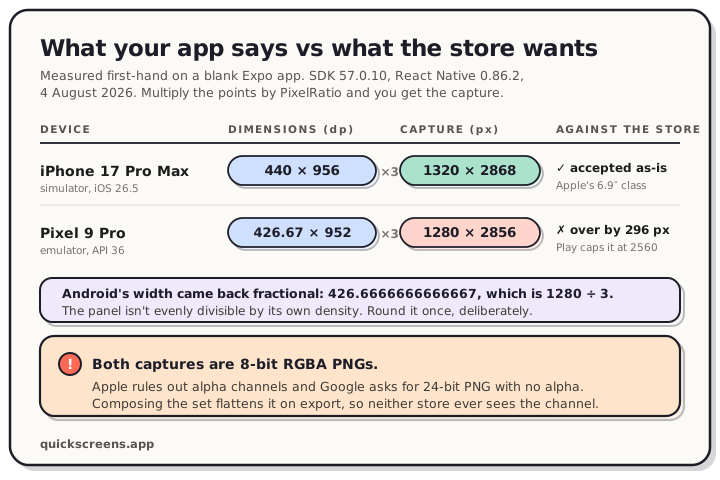
Measured first-hand on Expo SDK 57.0.10 and React Native 0.86.2, 4 August 2026. On an iPhone 17 Pro Max simulator running iOS 26.5, Dimensions reports 440 by 956 density-independent points, PixelRatio is 3, and the capture writes 1320 by 2868 pixels, which is exactly Apple's largest accepted size for the 6.9-inch display class. On a Pixel 9 Pro emulator running API 36, Dimensions reports a fractional 426.67 by 952 points, PixelRatio is 3, and the capture writes 1280 by 2856 pixels, which is 296 pixels past Google Play's limit of twice the short side.
How to take a screenshot in React Native or Expo
For App Store and Google Play artwork, capture the complete simulator or emulator screen:
# iOS Simulator
xcrun simctl io booted screenshot shot-01.png

# Android emulator or connected device
adb exec-out screencap -p > shot-01.png
Google documents that exact adb exec-out screencap -p route. Expo’s store-assets guide starts with the same practical answer: open the app on a device and take screenshots. The distinction matters because Expo also has an in-app screenshot tutorial built around react-native-view-shot; that captures a referenced React Native view, not the whole device frame and system chrome you usually want as raw store material.
Why there is no Expo CLI screenshot command
Here's the full command list from npx expo --help on SDK 57:
start, export
run:ios, run:android, prebuild
install, customize, config, serve
login, logout, whoami, register
No screenshot. React Native's own package doesn't export one either. So unlike a Flutter project, where flutter screenshot delegates to the device and hands you a file, an Expo project sends you to the platform tools.
Both routes are well worn, and we've measured each of them: what xcrun simctl writes on the iOS side, and what adb screencap writes on the Android side. Those numbers apply here unchanged, because they're properties of the capture tool rather than the framework.
Your app's numbers aren't the store's numbers
React Native lays out in density-independent points. The stores specify pixels. PixelRatio is the bridge: get() returns the device density, while getPixelSizeForLayoutSize() converts a layout size to an integer pixel size. React Native’s Dimensions object reports the matching width, height and scale values for the window and screen.
We rendered those values on screen and captured the result. Expo SDK 57.0.10, React Native 0.86.2, measured 4 August 2026:
| iPhone 17 Pro Max (iOS 26.5) | Pixel 9 Pro (API 36) | |
|---|---|---|
Dimensions.get('window') |
440 × 956 | 426.6666666666667 × 952 |
Dimensions.get('screen') |
440 × 956 | 426.6666666666667 × 952 |
PixelRatio.get() |
3 | 3 |
| Capture written to disk | 1320 × 2868 | 1280 × 2856 |
Three things fall out of that table.
The dp figure can be fractional. Android reported a width of 426.6666666666667, which is 1280 ÷ 3. Nothing is wrong; the panel just isn't divisible by its own density. It matters the moment you try to derive a canvas size from Dimensions, because you'll get a fraction and then you'll round it somewhere you didn't intend to.
Window and screen were identical on both. On Android that's Expo's doing, and it's explicit: the generated android/gradle.properties contains edgeToEdgeEnabled=true. Your app owns the whole panel, status bar and gesture area included. You can see it in the capture, where the clock and the gesture pill sit directly on the app's own background.
Multiply and you get the capture, exactly. 440 × 3 = 1320. 956 × 3 = 2868. Same on Android: 426.67 × 3 = 1280, 952 × 3 = 2856. The capture is your layout at full density, every time.
Where each capture lands against its store
On iOS, 1320 × 2868 is the largest of the three portrait sizes Apple accepts for the 6.9-inch class. The raw capture from an iPhone 17 Pro Max simulator lands on a required App Store canvas with nothing to adjust. Every accepted size by display class is in our App Store screenshot sizes reference.
On Android it goes the other way. Google caps the long side at twice the short side. A 1280 × 2856 capture is 2.23 times as tall as it is wide, so it sits 296 pixels past the ceiling of 2560. That's a property of the panel shape rather than the emulator, so real phones do it too. The Google Play screenshot sizes reference has the full rule set.
Both captures also came back as 8-bit RGBA PNGs. Apple's spec rules out alpha channels and Google asks for 24-bit PNG with no alpha, so the default file carries the one thing both specs name. Every pixel in ours was fully opaque, which is why nothing looks wrong when you preview it.
Capturing a set worth uploading
Boot the device, freeze what you can, capture what you need:
# iOS: consistent status bar across the whole set
xcrun simctl status_bar booted override \
  --time "9:41" --batteryState charged --batteryLevel 100
xcrun simctl io booted screenshot shot-01.png

# Android
adb exec-out screencap -p > shot-01.png
Run the status bar override before the first capture, not after, so all ten screenshots match each other. React Native core ships no equivalent of Flutter's integration_test capture hook, so if you want a set that regenerates whenever the UI changes, that job belongs to your end-to-end runner rather than the framework.
Turning captures into listing screenshots
A capture is source material. A listing screenshot is what you upload: the capture inside a device frame, on a background, with one line of text saying what the screen does.
Composing fixes both problems above without a flag. The export gets flattened, so the alpha channel never reaches either store. You pick the canvas instead of inheriting it, so Google's ratio rule stops being your problem. Design the Play set at 1080 × 1920 and you're at 9:16, inside the limit and above the 1080 px threshold Google wants for promotional placements. Apple's canvases are fixed sizes you choose from a list.
In the QuickScreens editor you drop in the captures, pick a frame, write one caption per screen, and drag to reorder. The canvas is locked to each store's dimensions, so nothing drifts off-size.
One Expo codebase means two listings. Build a single project, then export the Apple sizes and the Play sizes from it. Android needs one asset iOS has no equivalent for: a 1024 × 500 feature graphic, which you can't publish a listing without. We wrote up where it gets cropped.
Frequently asked questions
Is there an expo screenshot command?
No. The Expo CLI on SDK 57 ships start, export, run:ios, run:android, prebuild, install, customize, config, serve, and the auth commands. Capturing is done with xcrun simctl io booted screenshot on iOS and adb exec-out screencap -p on Android.
What size are React Native screenshots?
Whatever the device panel is, in pixels. Your app reports density-independent points, so multiply by PixelRatio.get(). An iPhone 17 Pro Max simulator reports 440 × 956 at a ratio of 3 and captures at 1320 × 2868.
Why does Dimensions return a decimal on Android? Because the panel width isn't evenly divisible by the density. Our Pixel 9 Pro reported 426.6666666666667, which is 1280 ÷ 3. Round it yourself if you need an integer, and round once.
Can I upload an Expo capture straight to the stores? On iOS a 1320 × 2868 capture is an accepted size, though it'll carry an alpha channel Apple's spec rules out. On Android the common phone capture breaks Google's aspect ratio limit before you've made a single design choice. Composing solves both.
Does Expo Go change the numbers?
We measured a real build made with npx expo run:ios and npx expo run:android, not Expo Go, so these are the numbers your shipped app produces.
Do I need a Mac for the iOS screenshots? To build and submit an iOS app, yes. For the artwork itself you only need the captures, so the composing and exporting happens in a browser.
Capture with the platform tools, then treat those files as source material. Open the editor, drop in the simulator and emulator PNGs, and export the App Store and Google Play canvases from the same project.