September 21, 2026 · 7 min read
iPhone 6.9" screenshot gotchas (and Duo sizes Apple published early)
Apple lists Duo sizes before upload works, puts the iPhone Requirement on 6.5", and 70 of 99 top listings still ship that older class. What to upload today.
Apple's screenshot specifications page now lists iPhone Duo sizes, but the same block says App Store Connect upload support arrives later this year. Meanwhile the iPhone class that still carries the only Requirement line is 6.5", not 6.9", and that is the class most top listings actually upload.
We re-read Apple's screenshot specifications as raw HTML on 21 September 2026, and we cross-checked the findings against our 99-listing top-chart sample from 22 August 2026 (679 iPhone screenshot files). The gotchas below are documentation and measurement, not conversion claims. Neither store publishes install lift by display class.
Update, 12 October 2026: Apple has since renamed these classes. 6.9" is now "iPhone with Dynamic Island (large display)" and 6.5" is "iPhone with Face ID (large display)". The Duo "later this year" Note was replaced by an April 2027 requirement, the 6.9" slot gained a fallback Note, and the 6.1" slot now fills from 6.3". Pixel sizes are unchanged. Our renamed-class map has the current wording; the field data below still stands.
Read the chart description
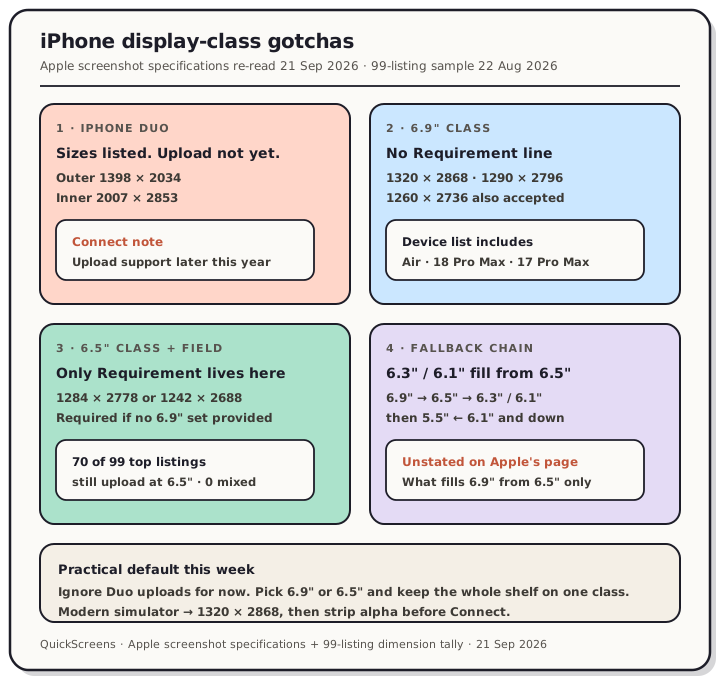
Four-panel teardown from Apple screenshot specifications re-read 21 September 2026 and the QuickScreens 99-listing sample. Panel one: iPhone Duo outer 1398 by 2034 and inner 2007 by 2853 listed, with upload support later this year. Panel two: 6.9 inch class accepts 1320 by 2868, 1290 by 2796 and 1260 by 2736 with no Requirement line. Panel three: 6.5 inch class carries the only Requirement and is what 70 of 99 top listings upload. Panel four: 6.3 and 6.1 inch slots fill from 6.5 inch, not directly from 6.9 inch.
Gotcha 1: Duo sizes are on the page before you can upload them
Under the iPhone accordion, Apple now opens with an iPhone Duo block:
| Display | Accepted sizes | Status today |
|---|---|---|
| Duo outer | 1398 × 2034, 2034 × 1398 | Listed |
| Duo inner | 2007 × 2853, 2853 × 2007 | Listed |
The Note under that block is the part that matters for shipping: "Support for uploading assets for this device in App Store Connect will be available later this year."
So the dimensions are real primary-doc numbers, and the upload slot is not a thing you can plan a release around yet. Designing a Duo set this week does not unblock anything in Connect. Treat the block as a heads-up, not a checklist item.
Gotcha 2: The Requirement sits on 6.5", not on 6.9"
Read the 6.9" and 6.5" blocks next to each other on the same day. The 6.9" block lists devices (including iPhone Air and iPhone 18 Pro Max on the 21 September page) and three accepted portrait sizes: 1320 × 2868, 1290 × 2796, and 1260 × 2736. It carries no Requirement line and no Note.
The Requirement is on the 6.5" block: "Required if app runs on iPhone and screenshots for 6.9" display aren't provided." Accepted 6.5" sizes remain 1284 × 2778 and 1242 × 2688.
That wording is why a 6.5"-only upload is still a legal iPhone set. It is also why "you must ship 1320 × 2868" is a stronger claim than Apple's page supports.
Gotcha 3: Most top listings still upload the older class
In our 22 August 2026 sample of 99 top-charting US listings:
| Display class | Listings | Share |
|---|---|---|
| 6.5" (1284 × 2778 or 1242 × 2688) | 70 | 71% |
| 6.9" (1320 × 2868, 1290 × 2796, or 1260 × 2736) | 28 | 28% |
| 6.3" | 1 | 1% |
Not one listing mixed classes inside its own set. The single most common file size was 1242 × 2688 (301 of 679 files). Full method and the games-vs-apps caption split live in the examples teardown.
If you inherit a 6.5" set, nothing on Apple's page forces a rebuild to 6.9" before you can ship. If you are starting fresh on a modern simulator that writes 1320 × 2868, that is also fine. Pick one class and keep every file in the shelf on it.
Gotcha 4: Smaller slots fill from 6.5", not straight from your 6.9" upload
Apple's Notes name the class each missing slot is filled from. On the 21 September page:
- 6.5" Note: if accepted sizes aren't provided, scaled screenshots for 6.9" displays are used (so the 6.5" slot is filled from a 6.9" upload).
- 6.3" and 6.1" Notes: filled from 6.5" displays.
- Then 5.5" from 6.1", 4.7" from 5.5", and so on down the legacy chain.
So a single 6.9" upload still reaches the smaller iPhone slots, but it does so through the 6.5" hop for 6.3" and 6.1". That is the chain we already document on the App Store screenshot sizes reference.
What the page still does not say is what fills the 6.9" slot when you only provide 6.5". The only scaling Note that mentions 6.9" runs the other way. We have not tested the reverse and will not guess. Seventy of the 99 listings we measured are living on that undocumented side of the matrix, which is a fact about the charts, not proof that Apple's undocumented path is optimal for a new unknown app.
Gotcha 5: Simulator pixels are not the same problem as Connect pixels
A current large-iPhone simulator capture lands on a 6.9" accepted size. We measured that path on an iPhone 17 Pro Max simulator: 1320 × 2868, which is exactly Apple's largest 6.9" pair (React Native / Expo workflow).
The failure mode that still bites after you pick the right class is alpha. Simulator and emulator captures write RGBA even when every pixel looks opaque, and Apple's page still says images can't include alpha channels or transparencies. That is a mechanical App Store Connect reject, separate from display class. Flatten or export JPEG before upload; the rules post and the Xcode simulator walkthrough cover the trap in detail.
A second trap: app preview video resolutions are not screenshot resolutions. 1320 × 2868 is valid for screenshots and wrong for the preview slot (Apple's preview sizes for current iPhones are 886 × 1920 / 1920 × 886). Mixing those two jobs is how teams burn an afternoon on a file that "looks the right size."
What to do this week
- Ignore Duo uploads until Connect actually accepts them. Keep the published sizes on a watch list.
- Pick 6.9" or 6.5" and stay there for the whole iPhone shelf. Both are legal. Mixing is the behaviour nobody in our 99-listing sample did.
- If you already ship 6.5", you are aligned with most of the top charts and with Apple's Requirement wording. Rebuild to 6.9" only if you want the modern panel as the master, not because Connect is forcing you.
- If you capture on a modern simulator, keep 1320 × 2868, strip alpha, and let Apple's chain fill smaller classes.
- Size captions for the store render, not the canvas. A 1320-wide upload draws around 220 CSS pixels on a desktop product page in our measurement (caption size).
Build the set once in QuickScreens, lock one display class, and export store-exact files without hand-managing the pixel matrix.
Frequently asked questions
Do I need iPhone 6.9" screenshots to submit? Only if you do not provide a 6.5" set. Apple's Requirement line (re-read 21 September 2026) sits on the 6.5" block: required if the app runs on iPhone and 6.9" screenshots aren't provided. Providing 6.9" alone also satisfies iPhone screenshot coverage via the published scaling Notes.
Should I upload iPhone Duo screenshots now? Not yet. Apple lists Duo outer and inner sizes on the specifications page, and the same block says upload support in App Store Connect will be available later this year. Design if you want; do not block a release on a slot that is not open.
What size should a modern iPhone simulator export target? 1320 × 2868 matches Apple's largest accepted 6.9" size and is what our iPhone 17 Pro Max simulator measurement produced. Strip the alpha channel before App Store Connect upload.
Why do so many top apps still use 1242 × 2688? Because it is an accepted 6.5" size, and Apple's Requirement allows a 6.5"-only set when no 6.9" set is provided. In our August sample it was the single most common file size (301 of 679).
If I upload only 6.9", do 6.3" and 6.1" get my 6.9" art directly? No. Apple's Notes say those slots are filled from 6.5" displays. A 6.9" master still reaches them, but through the 6.5" hop. Details are on the sizes reference.
Does picking 6.9" vs 6.5" change installs? We have no conversion data either way, and Apple does not publish any. Treat the choice as a master-asset and scaling decision, not as an ASO lever we can measure.