October 12, 2026 · 10 min read
Apple renamed iPhone screenshot sizes: the inch-to-hardware map
6.9" is now "iPhone with Dynamic Island (large display)" and 6.5" is "Face ID (large display)". Same pixels, a new fallback chain, and Duo due April 2027.
Apple's screenshot specifications page no longer sorts iPhones by inches. The old 6.9" class is now "iPhone with Dynamic Island (large display)", and the old 6.5" class is "iPhone with Face ID (large display)". Every accepted pixel size is the same as it was in September, so nothing you exported last month became invalid. What did change: two fallback Notes, a new "Required device sizes" line that names a different class than the Requirement row, and an April 2027 date for iPhone Duo screenshots.
To see exactly what moved, we compared the Internet Archive's capture of Apple's screenshot specifications from 22 September 2026 with the live page fetched on 12 October 2026, line by line. This post is the map from the old labels to the new ones. If you want the field data on which class top apps actually upload, that's in the 6.9" and Duo gotchas post.
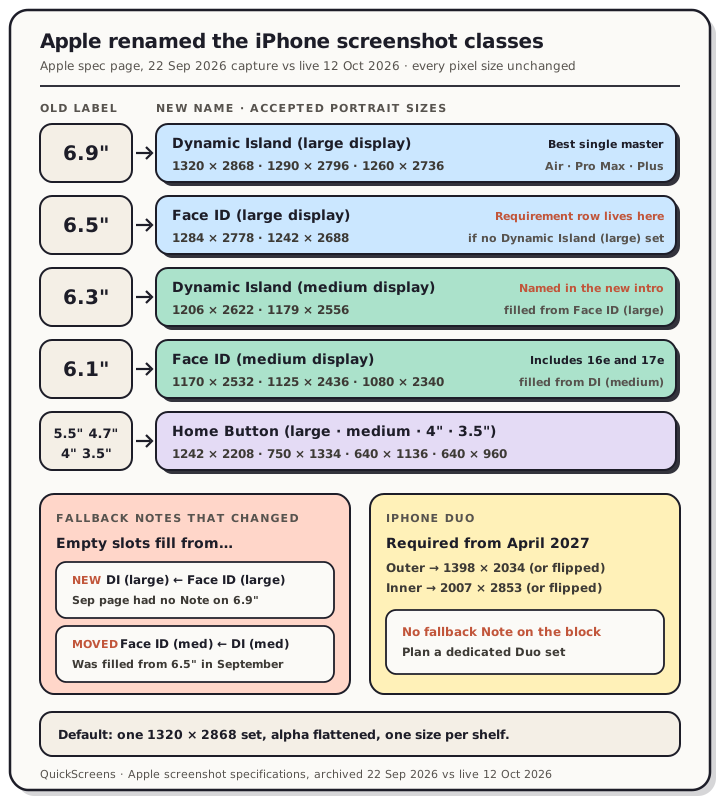
Read the chart description
Map built from Apple's screenshot specifications page, comparing the 22 September 2026 capture with the live page on 12 October 2026. Every accepted pixel size is unchanged. 6.9 inch is now iPhone with Dynamic Island (large display), 6.5 inch is iPhone with Face ID (large display), 6.3 inch is Dynamic Island (medium display), 6.1 inch is Face ID (medium display), and the home button phones keep large, medium, 4 inch and 3.5 inch names. Two fallback notes changed: Dynamic Island (large) is now filled from Face ID (large), and Face ID (medium) is now filled from Dynamic Island (medium) instead of 6.5 inch. iPhone Duo screenshots, 1398 by 2034 outer and 2007 by 2853 inner, become required in April 2027.
Old label, new label, same pixels
| Old label | New name on Apple's page | Accepted portrait sizes | Example devices Apple lists |
|---|---|---|---|
| 6.9" | iPhone with Dynamic Island (large display) | 1320 × 2868, 1290 × 2796, 1260 × 2736 | iPhone Air, 18 Pro Max, 17 Pro Max, 16 Plus, 14 Pro Max |
| 6.5" | iPhone with Face ID (large display) | 1284 × 2778, 1242 × 2688 | iPhone 14 Plus, 13 Pro Max, 11 Pro Max, 11, XR |
| 6.3" | iPhone with Dynamic Island (medium display) | 1206 × 2622, 1179 × 2556 | iPhone 18 Pro, 17 Pro, 17, 16, 15 Pro, 14 Pro |
| 6.1" | iPhone with Face ID (medium display) | 1170 × 2532, 1125 × 2436, 1080 × 2340 | iPhone 17e, 16e, 14, 13 mini, 12, X |
| 5.5" | iPhone with Home Button (large display) | 1242 × 2208 | iPhone 8 Plus, 7 Plus, 6s Plus |
| 4.7" | iPhone with Home Button (medium display) | 750 × 1334 | iPhone SE (2nd and 3rd gen), 8, 7 |
| 4" | iPhone with Home Button (4" display) | 640 × 1136 or 640 × 1096 | iPhone SE (1st gen), 5s |
| 3.5" | iPhone with Home Button (3.5" display) | 640 × 960 or 640 × 920 | iPhone 4s, 4 |
For every class from Home Button (medium) up, landscape is the same pair flipped. The device lists didn't change either. Only the headings did.
The inch labels were already loose, which is probably the best argument for the new names. The old 6.9" block held the iPhone Air (a 6.5-inch phone) and the 6.7-inch Plus models. The old 6.5" block held the iPhone XR and iPhone 11, which have 6.1-inch screens. "My phone is 6.5 inches, so I need the 6.5" set" was never a safe rule. Under the new names, the iPhone Air sits plainly in Dynamic Island (large), and that's the slot its 1260 × 2736 screenshots belong in.
A quick way to place a modern iPhone: phones with a Dynamic Island are in one of the two Dynamic Island classes, and Apple files the 16e and 17e under Face ID (medium) with the older notched models. Whether a phone counts as "large" or "medium" depends on which list Apple put it in, so check the table rather than the box it came in.
The fallback chain changed in two places
Each class on Apple's page has a Note saying which class fills its slot when you don't upload that size. Two of those Notes are different from September.
Dynamic Island (large) now has a fallback. On 22 September the 6.9" block had no Note at all, which meant the page never said what filled the 6.9" slot when you only shipped 6.5". Now it does: "scaled screenshots for iPhone with Face ID (large display) are used." The Face ID (large) Note still points back the other way. So the two large classes cover for each other, and a set in either one reaches both.
Face ID (medium) now fills from Dynamic Island (medium). In September, both 6.3" and 6.1" were filled from 6.5". Today the old 6.3" class (Dynamic Island medium) still fills from Face ID (large), but the old 6.1" class (Face ID medium) fills from Dynamic Island (medium). That's one more hop than before.
The full chain on the 12 October page:
- Dynamic Island (large) ⇄ Face ID (large)
- Dynamic Island (medium) ← Face ID (large)
- Face ID (medium) ← Dynamic Island (medium)
- Home Button (large) ← Face ID (medium)
- Home Button (medium) ← Home Button (large), then 4" and 3.5" down the line
In practice this doesn't change much. One large set still reaches every iPhone slot. It does matter if you upload a hand-tuned medium set: if you supply Dynamic Island (medium) art, the Face ID (medium) phones now get that art scaled, not your large set.
The Requirement row and the new intro don't name the same class
This is the part to read twice. The page now opens with a "Required device sizes" section that says:
iPhone: At least one screenshot for iPhone with Dynamic Island (medium display).
Further down, the only iPhone Requirement row is still on Face ID (large), reworded with the new names: "Required if app runs on iPhone and screenshots for iPhone with Dynamic Island (large display) aren't provided."
So one line points at the medium Dynamic Island class and the other points at the large classes. The page reconciles them through scaling. A new "Display scaling" paragraph says that if your interface is consistent across sizes, "you only need to provide screenshots for the highest required resolution," and App Store Connect scales them down. Per the Notes, a large set is exactly what fills the Dynamic Island (medium) slot.
Our reading is that a Dynamic Island (large) set still satisfies both lines. We haven't pushed a test submission through review to prove it, and Apple doesn't spell it out. If Connect ever flags the medium slot on your app, uploading 1206 × 2622 files there is the direct fix, and both sizes in that class are already on the table above.
iPhone Duo got a date
In September, the Duo block carried one Note: upload support in App Store Connect "will be available later this year." That line is gone. Apple's 5 October developer news post says iPhone Duo reaches customers on 23 October 2026, that you can submit Duo-optimized apps in App Store Connect now, and that "starting April 2027, any apps or games submitted will need to include screenshots for iPhone Duo."
The specifications page words it more narrowly. Its new Duo Note says screenshots "will be required for any app using the iOS 27.1 SDK or later" from April 2027. We'd plan around the stricter news wording until Apple makes the two match.
| Duo display | Portrait | Landscape |
|---|---|---|
| Outer | 1398 × 2034 | 2034 × 1398 |
| Inner | 2007 × 2853 | 2853 × 2007 |
Two things to notice. The Duo block has no fallback Note, so nothing on the page says your other iPhone sets scale into it. And Duo app previews aren't a new format: Apple's app preview page lists the same 886 × 1920 / 1920 × 886 accepted resolutions as the Dynamic Island classes.
What the rest of the page now says
A few smaller wording changes came along with the rename:
- The intro now says you "must include at least one screenshot and can upload up to 10 screenshots per device size," and that all screenshots must follow the App Review Guidelines.
- The iPad requirement is phrased the same way as iPhone's: at least one screenshot for the 13-inch display if your app supports iPadOS. Sizes are unchanged (Apple Watch and iPad sizes has the detail).
- Apple also published new App Review guidance for guideline 2.3.3. It says review approves only submissions where more than half of each device's screenshots show the app in use. With three screenshots, two must be the app. With four, three must.
- The alpha rule is unchanged: "Images can't include alpha channels or transparencies." Simulator captures still trip it (rules and rejections covers the fix).
How inch-era advice maps now
| If a guide says | Read it as |
|---|---|
| "Upload 6.9" at 1320 × 2868" | Dynamic Island (large), 1320 × 2868. Still the best single master. |
| "6.5" is the required size" | Face ID (large) is required only when there's no Dynamic Island (large) set. |
| "6.3" and 6.1" fill from 6.5"" | Half true now. Dynamic Island (medium) fills from Face ID (large); Face ID (medium) fills from Dynamic Island (medium). |
| "Nothing documents what fills 6.9"" | Out of date. Face ID (large) fills it. |
| "Duo uploads come later this year" | Out of date. Duo screenshots become required in April 2027. |
| "An iPhone 17 Pro Max simulator gives you 6.9"" | Still right. 1320 × 2868 is a Dynamic Island (large) size. |
What to upload this week
- One Dynamic Island (large) set at 1320 × 2868 if you're starting fresh. It meets the Requirement row directly and, per Apple's Notes, scales into every smaller iPhone slot.
- Keep your Face ID (large) set if you already ship one. It's still legal, and it now officially fills the Dynamic Island (large) slot too.
- Don't mix classes inside one shelf. Pick one master size and export every screenshot at it.
- Put Duo on the roadmap, not this week's release. The sizes are fixed and the deadline is April 2027. Nothing on Apple's page says another class scales into Duo, so plan for a dedicated set.
- Flatten alpha and keep more than half the set showing the real app. Those are the two rules most likely to bounce an otherwise correct upload.
If you build that set in QuickScreens, the export menu still uses the inch labels, but the pixels are the ones in Apple's table: the 6.9" group is Dynamic Island (large) and the 6.5" group is Face ID (large). There's no Duo preset yet. The App Store screenshot sizes reference covers iPad, Mac, Watch, TV and Vision Pro in one table.
Frequently asked questions
What is "iPhone with Dynamic Island (large display)" in App Store Connect? It's Apple's new name for the class that used to be labelled 6.9". Accepted portrait sizes are 1320 × 2868, 1290 × 2796 and 1260 × 2736, covering iPhone Air, the Pro Max models from 14 onward, and the 15 and 16 Plus.
What size is "iPhone with Face ID (large display)"? 1284 × 2778 or 1242 × 2688 in portrait. It's the old 6.5" class, and it's still the class that carries the iPhone Requirement row: required if your app runs on iPhone and you don't provide Dynamic Island (large) screenshots.
Did any iPhone screenshot pixel sizes change? No. Comparing the 22 September 2026 capture with the 12 October 2026 page, every accepted iPhone size and device list is identical. Only the class names, two fallback Notes, the intro and the Duo Note changed.
Do I need to upload "iPhone with Dynamic Island (medium display)" screenshots? The new intro says you need at least one for that class, while the Requirement row and the scaling Notes say a large set fills it. We read that as a large set being enough, but Apple hasn't said so in plain words. If Connect asks, upload 1206 × 2622 or 1179 × 2556.
When are iPhone Duo screenshots required? From April 2027. Apple's news post says any app or game submitted from then needs Duo screenshots, and the specifications page says any app built with the iOS 27.1 SDK or later. Sizes are 1398 × 2034 (outer) and 2007 × 2853 (inner), plus landscape.
Which class does the iPhone Air belong to? Dynamic Island (large display), at 1260 × 2736. It has a 6.5-inch screen, which is exactly the kind of mismatch the old inch labels invited.