September 3, 2026 · 6 min read
Product page optimization for screenshots: what Apple actually multiplies
Apple's Product Page Optimization lets you A/B test screenshots in up to three treatments. The hard part is regenerating every size for each arm.
Apple's Product Page Optimization lets you show up to three alternate App Store product pages against your original, including different screenshots, app previews, and icons. Traffic is split however you configure it. Results show up in App Analytics. You can promote a winner to everyone.
That paragraph is the easy part. The part that stops most teams is quieter: every treatment that changes screenshots still has to satisfy the same size and review rules as a normal listing upload. One caption test is not one file. It is one full set per treatment, across every required display class.
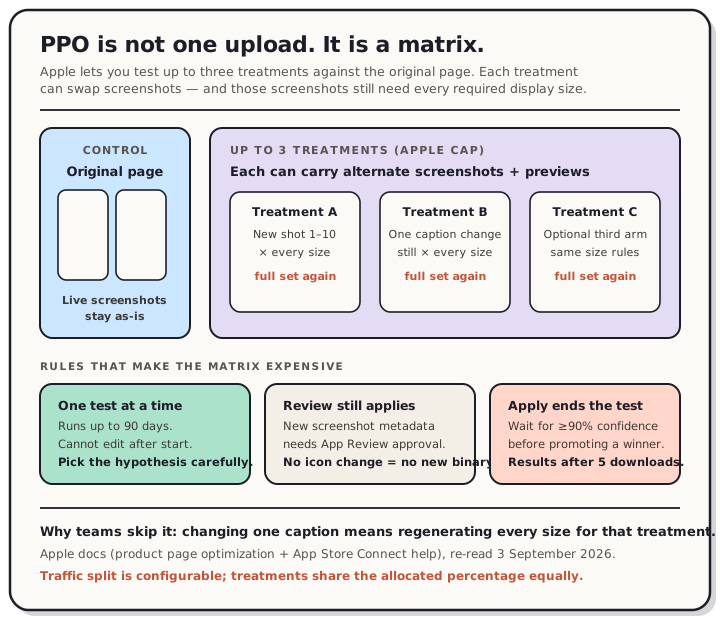
Read the chart description
Diagram of one control page plus up to three treatments, each needing a full screenshot set across display sizes. Sourced from Apple Product Page Optimization docs, read 3 September 2026.
What Product Page Optimization is (and is not)
Apple's Product Page Optimization page is the primary source. You create treatments in App Store Connect, allocate a percentage of App Store traffic to the test, and randomly selected people on iOS and iPadOS 15 or later keep seeing the same treatment for the life of the test. Treatments can appear in search results and on the Today, Games, and Apps tabs, the same way the original page can.
It is not Custom Product Pages. PPO is a time-bounded experiment against your default page. Custom Product Pages are persistent audience-specific URLs. If you need a permanent yoga-campaign landing page, that is CPP. If you need to know whether caption A beats caption B for everyone, that is PPO.
Google Play's parallel is Store listing experiments, which A/B tests listing graphics and localized text on Play. Different console, same idea: change the creative, measure installs, keep the winner.
The rules that decide whether you finish the setup
Re-read from Apple's docs on 3 September 2026:
- Up to three treatments against the original. More arms mean slower conclusive results.
- One test at a time, for up to 90 days, or until you stop it. You cannot change a test after it starts.
- Traffic proportion is yours to set. If you allocate 30% to a three-treatment test, each treatment gets 10% and the original keeps 70%.
- Localizations can be included or excluded. People whose storefront language is out of the test never enter it.
- App Review still applies to new treatment metadata. Screenshot-only tests can go to review without a new app version. Alternate icons must already live in the binary of the published app.
- Apply ends the test. Apple recommends waiting until a treatment is better or worse than baseline with at least 90% confidence. Analytics surfaces the test after at least five first-time downloads are attributed to it.
Apple also publishes worked examples on that same page. Simply Piano tested adding an app preview as the first asset and saw the original (screenshots only) win by about 3% conversion at 100% confidence. Peak Brain Training tested icon designs for 44 days and saw an 8% conversion lift on the winning icon. Those are Apple's case studies, not ours.
Why screenshot treatments are the expensive arm
Icons and preview videos are heavy for different reasons (binary inclusion for icons, encode + review for video). Screenshots look cheap until you multiply them.
A treatment that only changes the first screenshot still needs a compliant file for every display size you support. Change a caption, and you re-export the whole size ladder again. Run three treatments, and you are maintaining four full sets: control plus A, B, and C. That is before localization. It is the same matrix problem as localizing store screenshots, except now the variants are hypotheses instead of languages.
Search cards make the first few frames especially costly to get wrong. Apple may show only your first one to three screenshots in search, which is why we measured that surface separately in the first three screenshots. Caption type that looks fine at full size often collapses at the size the store actually paints; see caption size.
And once a winner is applied, you are back under the normal App Store update rules: approved screenshots are sticky until the next version unless you are still inside a PPO treatment workflow. That interaction with release cadence is covered in how often you can update store screenshots.
A test design that survives the matrix
Keep the hypothesis narrow enough that the export cost is worth it.
Good first tests
- First screenshot only: benefit-led caption vs feature-led caption, same UI crop.
- Dark canvas vs light canvas on shot one (we already measured how even the top charts split in dark vs light).
- App preview in slot one vs screenshots only (Apple's Simply Piano example shows the preview is not automatically the winner).
Usually too wide for one test
- New icon + new screenshots + new preview in the same treatment. You will not know which change moved conversion.
- Three unrelated creative directions at once on a low-impression app. The 90-day clock may expire before confidence arrives. Use Apple's duration estimate in App Store Connect before you start.
Operational checklist
- Write the hypothesis in the test's reference name (64 characters, make it searchable later).
- Duplicate the control set, change one variable, export every required size with no alpha (see screenshot rules).
- Submit treatment metadata for review, then start the test only after approval.
- Leave it alone until Analytics shows ≥90% confidence or you hit a pre-committed stop rule.
- Apply the winner, or stop and start a cleaner follow-up test. Do not "tweak mid-flight"; Apple does not allow edits after start.
The honest product takeaway
Product Page Optimization is free traffic you are already paying for with your listing. The reason it stays unused is rarely the analytics UI. It is the screenshot factory sitting behind each treatment.
If exporting a second and third set still means rebuilding frames by hand for every iPhone and iPad class, the rational move is to skip the test. If your layout system can duplicate a set, change one caption, and regenerate the size matrix, PPO becomes a weekly habit instead of a quarter-long project.
That regeneration loop is what QuickScreens is for. Build the control set once, branch a treatment, change the thing you are actually testing, and export every size without starting over.
Frequently asked questions
Is Product Page Optimization the same as Custom Product Pages? No. PPO splits organic traffic across temporary treatments to find a better default page. Custom Product Pages are permanent alternate pages reached by their own URLs (and, where Apple allows, assigned keywords).
Do screenshot treatments need a new app version? Not by themselves. Apple says tests that do not include alternate app icons can be submitted for review independent of a new app version. Icon tests require the variants in the published binary.
How long should a screenshot test run? Until you have a decision rule you trust. Apple caps a test at 90 days and recommends waiting for at least 90% confidence before applying a treatment. Use the in-console duration estimate, which is based on your recent impressions and downloads.
Can I change screenshots after the test starts? No. Apple's docs are explicit: you cannot change a test once it has started. Stop it and create a new one if the creative is wrong.
Does Google Play have the same tool? Play offers Store listing experiments for graphics and localized text. The console and metrics differ, but the creative lesson is the same: test one visible change at a time and budget for exporting every required asset.