August 10, 2026 · 11 min read
Localizing store screenshots: what actually changes
We compared 15 App Store listings across six storefronts. 13 serve different screenshots abroad, and the difference is mostly the caption.
Most apps that localize their screenshots only translate the caption. The app inside the device frame stays in the original language, and the picture underneath the words is the same picture.
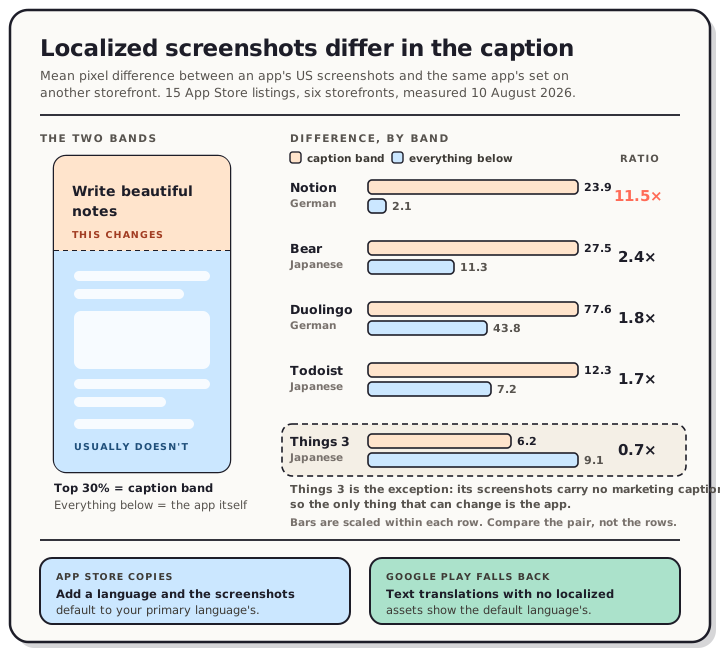
We checked. On 10 August 2026 we pulled 15 App Store listings from six storefronts, compared the actual image files, and then compared the pixels. Thirteen of the fifteen serve a different screenshot set somewhere. When we measured where those sets differ, the change concentrated in the top third of the image, which is where captions live. That matters, because translating a caption is an afternoon of work and redrawing a screenshot set is not.
Read the chart description
A diagram showing that localized store screenshots differ mostly in their caption. A screenshot is split into a caption band across the top thirty percent and the app interface below it. Measured mean pixel difference against the same app's US screenshots, on 10 August 2026: Notion's German set differs by 23.9 in the caption band and 2.1 below it, an 11.5 times concentration; Bear's Japanese set 27.5 against 11.3, 2.4 times; Duolingo's German set 77.6 against 43.8, 1.8 times; Todoist's Japanese set 12.3 against 7.2, 1.7 times. Things 3's Japanese set is the exception at 6.2 against 9.1, 0.7 times, because its screenshots carry no marketing caption. A footer contrasts the two stores: on the App Store, adding a language copies the primary language's screenshots into the new localization, so a localized set can be an untouched copy; on Google Play, text translations without localized graphic assets show the default language's graphics.
What we measured
Every App Store product page carries a JSON blob listing its screenshot assets. We read that blob for 15 apps on the US, Japanese, German, French, Brazilian and Korean storefronts, then downloaded the images themselves and compared them as grayscale pixel arrays.
The apps were a deliberate mix of giants and independents: Duolingo, Spotify, Notion, Telegram, Strava, Canva, CapCut, Shazam and Todoist on one side, Bear, Halide, Overcast, Flighty, Things 3 and CARROT Weather on the other.
| Storefronts serving a different set | Apps |
|---|---|
| All five non-US storefronts | Duolingo, Spotify, Notion, Bear, Todoist, Shazam, Canva, CapCut, CARROT Weather |
| Four of five | Telegram, Strava, Halide |
| Three of five | Things 3 |
| None | Overcast, Flighty |
Those last two are the useful control. Overcast and Flighty serve byte-identical files on all six storefronts, which proves the asset identifier is stable across storefronts when the upload is the same. So a difference really is a difference, not an artifact of Apple's CDN handing out per-region URLs.
Counts move around too. CapCut shows 10 screenshots in the US and 4 in Brazil. Canva shows 10 in the US and 7 in Japan. Halide shows 9 and 5. Duolingo drops from 8 to 6 in Japanese and Korean. Strava's listing returns a 404 on the Korean storefront, so the app simply isn't sold there.
The difference is mostly the caption
Where a listing served the same number of screenshots in the same order, we could compare them one by one. We split each image into the top 30%, roughly the caption band, and everything below it, then measured the mean pixel difference in each.
| App | Storefront | Caption band | Everything below | Concentration |
|---|---|---|---|---|
| Notion | German | 23.9 | 2.1 | 11.5× |
| Notion | Japanese | 20.5 | 4.6 | 4.5× |
| Bear | Japanese | 27.5 | 11.3 | 2.4× |
| Bear | German | 15.9 | 8.6 | 1.9× |
| Duolingo | German | 77.6 | 43.8 | 1.8× |
| Todoist | Japanese | 12.3 | 7.2 | 1.7× |
| Todoist | German | 12.8 | 8.3 | 1.6× |
| Canva | German | 102.3 | 77.7 | 1.3× |
| Things 3 | Japanese | 6.2 | 9.1 | 0.7× |
Nine of the eleven pairs we could align this way put more change above the fold than below it. Notion's German set is the cleanest case: the caption band is eleven times more different than the rest of the image, which is what you get when you swap the words and leave the screenshot alone.
Bear is worth looking at directly. Its Japanese first screenshot reads 美しいメモを書き留める where the US one reads "Write beautiful notes". Inside the phone frame, both show the same English note about polar bears, same heading, same table, same highlighted text. The marketing line is Japanese and the product shot is not.
Things 3 is the exception, and it makes sense once you look at it. Its screenshots carry no marketing caption at all, just the app in a frame, so the only thing that can change is the app itself. Its difference sits below the caption band rather than in it. Todoist on Google Play sits at the other extreme: its Japanese listing translates the caption and the tasks inside the frame.
"Different" doesn't always mean "translated"
A different file can be an identical picture, and we nearly published a tally that ignored this.
Apple's own documentation explains why. When you add a language in App Store Connect, "screenshots and the properties for the new language default to those of the primary language, except for the description and keywords." A new localization starts as a copy. So a listing can carry a full set of per-language assets that are, visually, the same English screenshots.
We found a live example. CARROT Weather serves a distinct seven-image set on the Japanese storefront, so an asset-level check counts it as localized. Open the images and the first one is in Simplified Chinese, and the second is in English. The Japanese storefront was serving artwork that isn't Japanese when we looked on 10 August 2026. We can't see inside anyone's App Store Connect, so we're reporting what the storefront served, not what was intended. It's an easy thing to do and a hard thing to notice, which is exactly why the check at the end of this post is worth ten minutes.
The lesson for your own listing: comparing file names or asset IDs tells you nothing. Look at the pictures.
The two stores behave differently when a language is missing
This part is documented rather than measured, and the two rules are close to opposite.
Apple copies. Add a language and the screenshots default to your primary language's. If no localization matches the user's language, Apple says "the next most relevant localization is used," and otherwise the metadata displays in the primary language.
Google falls back. Play's documentation is blunt: "If you add text translations without localized graphic assets, your app's graphic assets show from the default language." Translate your description into twelve languages and add no images, and all twelve show your default screenshots.
The practical difference is what a half-finished job looks like. On Apple you get copies sitting in each localization, which is why CARROT's mismatch can persist quietly. On Google you get an honest fallback with nothing to go stale.
Two more rules worth knowing. Apple requires the same Apple Watch screenshot size "consistently across all localizations for the app". And if you ever change your primary language, Apple requires that the new language already have approved screenshots whose sizes match the current primary language.
Google also separates language from country. Store listing localization is keyed to "a user's language preference," and Play points you at custom store listings if what you want is different artwork by country or region.
So when is it worth it?
We don't have conversion data, and we're not going to invent any. Here's what the measurement supports, and where it stops.
Translate the caption when the language is already in your app. If someone can use your app in Japanese, the screenshots promising them a Japanese experience should say so in Japanese. This is the cheap half and it's what most of our sample did.
Redraw the in-app content when the screenshot is mostly words. Todoist's screenshots are lists of tasks, so English tasks in a Japanese listing would be most of the image. Bear could get away with an English note because the note is scenery. Look at your own screenshot and ask what fraction of the pixels are language.
Skip it when your app isn't localized. Overcast and Flighty ship the same set everywhere. A translated caption over an English interface promises something the app doesn't deliver, and that's a worse outcome than an English caption.
Start where you already have installs. You can see which storefronts already send you traffic before you spend anything on the ones that don't.
The measurement doesn't say localizing screenshots increases installs. It says the practice is near-universal among apps that have localized themselves, and that the cheap version is the common one.
Doing it without redrawing anything
The workflow that falls out of this is caption-first, and it's the one the QuickScreens editor is built around.
You design the set once in your base language. The Languages panel keeps one caption table per language across the App Store's 43 supported localizations, with the base language detected from your browser. Each language tab shows a translated count, so a half-finished German set is visible rather than silent.
For the translating itself there's a CSV round-trip. Export a file with one row per caption and one column per language:
id,screen,en-US,de-DE,ja
text_a1b2,1,Plan your day,Plane deinen Tag,一日を計画する
Fill the empty columns however you like, with a translator, a spreadsheet or an LLM, and import it back. The id column is a stable key, so you can edit your base text or reorder rows without breaking the mapping. Right-to-left languages like Arabic and Hebrew flip the caption preview so you can see the layout before you commit to it.
Exporting a localized project produces one folder per locale, then one per size:
de-DE/1320x2868/de-DE-1320x2868-screen-01.png
ja/1320x2868/ja-1320x2868-screen-01.png
That's ready to drag into App Store Connect or Play Console a size at a time. fastlane deliver won't look inside the size folders, though, so flatten them into the locale folder first. Untranslated captions fall back to your base text, so every image in the ZIP is complete even if the translation isn't. Every accepted canvas size is on our App Store screenshot sizes reference and the Google Play screenshot sizes reference.
The ten-minute check
Whatever tool you use, verify the result on the store rather than in the console.
- Open your listing on the storefront you localized, using the country path:
apps.apple.com/jp/app/id<your id>. On Play, add&hl=jato the listing URL. - Look at the screenshots. Not the file names, the pictures.
- Confirm the caption is in the right language, and that it's the right language for that storefront.
- Check the count matches what you uploaded, since a missing localization shows a different number of images.
- Repeat for every language you added.
That sequence is what surfaced the Chinese-on-the-Japanese-storefront case in a sample of fifteen.
What this doesn't prove
Three limits.
This is the App Store web product page again, not the App Store app on a phone, and the same gap we flagged when we measured how small captions are actually displayed. Most installs happen in the app, where we can't measure without signing in.
Storefront is not the same thing as language setting. Requesting apps.apple.com/jp/ returns a page marked ja, which is what a Japanese user with default settings gets, but a user in Japan reading in English may see something else. Our comparison is storefront to storefront.
Fifteen apps is a sample, not a census, and it skews toward productivity apps and toward apps that have already invested in localization. It tells you what the practice looks like among apps that do it. It can't tell you what share of the store does it at all.
Frequently asked questions
Do I need different screenshots for each language on the App Store? No. Screenshots are per-localization, but adding a language copies your primary language's screenshots, so a new localization starts with working images. You replace them only where you want to.
What happens on Google Play if I translate the text but not the images? Play shows your default language's graphics. Google's documentation states it directly: add text translations without localized graphic assets and the graphics come from the default language.
Is it enough to translate just the caption? It's what most of the localized listings we measured do. In nine of eleven comparable pairs the change was concentrated in the caption band, and Bear's Japanese screenshots keep an English app interface inside the frame. Whether it's enough depends on how much of your screenshot is text.
How many languages does the App Store support for listings? Our editor's picker carries the App Store's 43 supported localizations. Google Play supports a longer list for store listing translations.
Does localizing screenshots help ASO? Localized keywords and descriptions affect what you rank for, and that's documented by both stores. We have no data showing screenshots alone move installs, and we won't claim it.
Do Apple Watch screenshots need to match across languages? Yes. Apple requires the same Apple Watch screenshot size consistently across all localizations for the app.
Translating a dozen captions is quick. Rebuilding the same layout a dozen times is what makes localizing screenshots expensive, and that part is avoidable. In the QuickScreens editor the layout is shared, the captions are a table, and the export fans out into per-locale folders at every size you need. One-time $25, no subscription.