October 19, 2026 · 10 min read
fastlane deliver screenshots: how it picks the slot, and four quiet traps
fastlane deliver picks the App Store slot from exact pixels, not folders. We ran 2.241.1 on 22 test files: API slot names, Duo support and four silent traps.
fastlane deliver doesn't care what you call your folders. It opens every PNG or JPEG sitting directly inside fastlane/screenshots/<locale>/, reads its exact pixel size, and drops it into the App Store Connect slot that size belongs to. The slot names it uses come from the App Store Connect API, and they still carry old inch labels: APP_IPHONE_67 is the slot Apple now calls "iPhone with Dynamic Island (large display)", and APP_IPHONE_61 is "Dynamic Island (medium display)", the class Apple's page now names as the required one.
Most of that is documented somewhere. What isn't written down is how deliver behaves when something is slightly off, so we tested it. On 19 October 2026 we installed fastlane 2.241.1 (released 15 October, the first version with iPhone Duo sizes), generated 22 test files with Pillow, and ran them through Deliver::Loader.load_app_screenshots, the function deliver calls before it uploads anything. Four of them went through without a single error, when each arguably should have stopped the run.
Scope, up front: this is what deliver does on your machine before the upload. We didn't push anything to App Store Connect, so nothing below claims what Apple's servers do afterwards.
Read the chart description
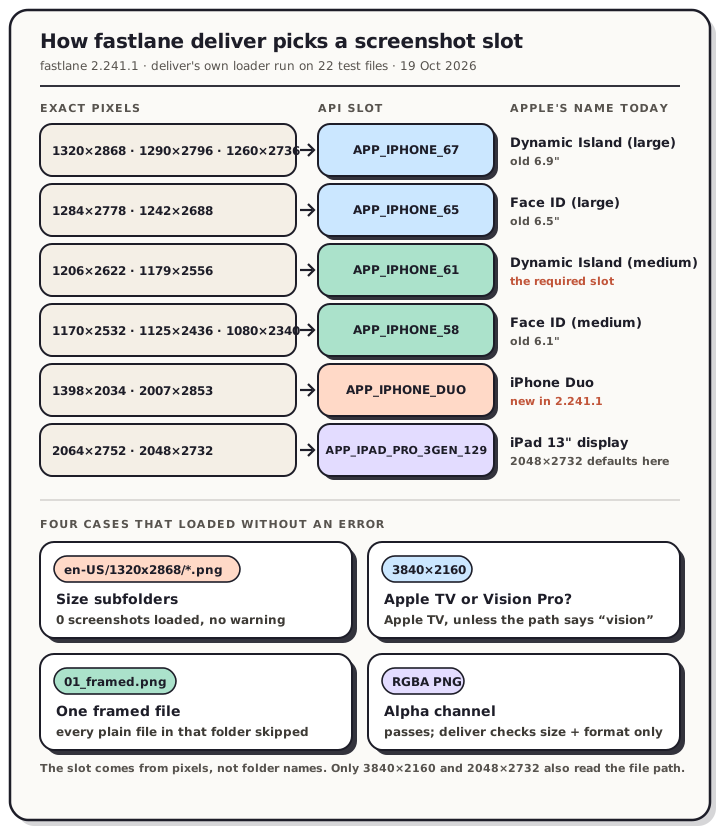
Measured with fastlane 2.241.1 on 19 October 2026 by running deliver's screenshot loader over 22 generated test files. Deliver picks the slot from exact pixel dimensions and uses App Store Connect API names that still carry old inch labels: APP_IPHONE_67 is Dynamic Island (large), APP_IPHONE_65 is Face ID (large), APP_IPHONE_61 is Dynamic Island (medium), APP_IPHONE_58 is Face ID (medium), APP_IPHONE_DUO is iPhone Duo, and APP_IPAD_PRO_3GEN_129 is the 13 inch iPad. Four cases produced no error: files in size subfolders loaded zero screenshots, 3840 by 2160 went to Apple TV unless the path contained the word vision, one framed file caused plain files to be skipped, and an RGBA PNG passed validation.
The slot map: pixels, API name, Apple's name
Deliver's app_screenshot.rb holds one table of accepted resolutions per display type and returns the first type whose list contains your file's exact width and height. These are the rows that matter for a current iPhone and iPad release, checked against Apple's screenshot specifications as they read on 19 October:
| Portrait sizes (landscape is the same pair flipped) | API slot deliver uses | Apple's name today | Old label |
|---|---|---|---|
| 1320 × 2868, 1290 × 2796, 1260 × 2736 | APP_IPHONE_67 |
iPhone with Dynamic Island (large display) | 6.9" |
| 1284 × 2778, 1242 × 2688 | APP_IPHONE_65 |
iPhone with Face ID (large display) | 6.5" |
| 1206 × 2622, 1179 × 2556 | APP_IPHONE_61 |
iPhone with Dynamic Island (medium display) | 6.3" |
| 1170 × 2532, 1125 × 2436, 1080 × 2340 | APP_IPHONE_58 |
iPhone with Face ID (medium display) | 6.1" |
| 1398 × 2034 (outer), 2007 × 2853 (inner) | APP_IPHONE_DUO |
iPhone Duo | none |
| 2064 × 2752, 2048 × 2732 | APP_IPAD_PRO_3GEN_129 |
iPad 13" display | 13" |
| 1488 × 2266, 1668 × 2420, 1668 × 2388, 1640 × 2360 | APP_IPAD_PRO_3GEN_11 |
iPad 11" display | 11" |
| 2880 × 1800, 2560 × 1600, 1440 × 900, 1280 × 800 (landscape only) | APP_DESKTOP |
Mac | none |
The API names lag twice over. APP_IPHONE_67 was named for the 6.7-inch Pro Max, then came to mean Apple's 6.9" class, and Apple has since dropped inches from its iPhone headings altogether. fastlane's own source admits it with comments like "These are actually 6.9" iPhones." There's no APP_IPHONE_69, either: Apple's ScreenshotDisplayType reference doesn't list one.
Every size we generated landed where the table says. A 1206 × 2622 file went to APP_IPHONE_61, a 1170 × 2532 file to APP_IPHONE_58, and a 1398 × 2034 file to APP_IPHONE_DUO.
Which fastlane version you need
If deliver says "Invalid screen size" for a 1320 × 2868 file, your fastlane is too old. That's the error in this fastlane issue, and the filename there had nothing to do with it. The 1320 × 2868 and 2064 × 2752 sizes came in with fastlane 2.230.0 on 18 December 2025. Before that, the newest iPhone and iPad canvases simply weren't in the table.
iPhone Duo is newer still. 2.241.1 added APP_IPHONE_DUO with Apple's outer and inner sizes on 15 October 2026. The pull request author reports a successful test upload. Apple's public ScreenshotDisplayType page didn't list APP_IPHONE_DUO when we checked on 19 October, so if your Duo upload fails, the docs lagging behind the API is one explanation and an unsupported value is the other. We can't tell you which from the outside. Apple's specifications page says Duo screenshots become required from April 2027 for apps built with the iOS 27.1 SDK or later, and that submitting them adds a badge to your product page telling people the app is optimized for Duo.
Trap 1: size subfolders load nothing, silently
The loader collects files with a flat glob, <locale>/*.{png,jpg,jpeg}. It doesn't recurse. So this tree:
fastlane/screenshots/en-US/1320x2868/en-US-1320x2868-screen-01.png
loaded zero screenshots in our test, and the loader printed nothing about it. It also skipped a .webp file without comment, since WebP isn't in the glob.
We should be honest about why we checked: that's exactly the layout our own localized export produces (<locale>/<size>/…), which suits dragging a folder into App Store Connect but not deliver. Flatten it before you run fastlane. Filenames already carry the locale and size, so nothing collides:
cd fastlane
find screenshots -mindepth 3 -type f -exec sh -c 'mv "$1" "$(dirname "$(dirname "$1")")/"' _ {} \;
find screenshots -mindepth 2 -type d -empty -delete
Run against our test tree, that turned 0 loaded files into 4, all routed to APP_IPHONE_67.
The opposite mistake is loud, at least. Sizes as top-level folders (screenshots/1320x2868/) and bare language codes (screenshots/en/) both stop the run with "Unsupported directory name(s)" and print the accepted names: 50 locales plus appleTV, iMessage and default. Those are App Store Connect locale codes, so it's en-US, de-DE and pt-BR, but ja, ko and it.
Trap 2: 3840 × 2160 goes to Apple TV unless the path says "vision"
Apple TV and Apple Vision Pro both accept 3840 × 2160, so the size alone can't decide. Deliver breaks the tie by checking whether the file's full path, lowercased, contains vision. Ours did this:
| File | Slot |
|---|---|
…/fltest/B/screenshots/en-US/07-big-16x9.png |
APP_APPLE_TV |
…/fltest/B/screenshots/en-US/08-vision-pro.png |
APP_APPLE_VISION_PRO |
…/visionkit-app/fastlane/screenshots/en-US/01-tv-shelf.png |
APP_APPLE_VISION_PRO |
The third row is the one to worry about. The file was a TV shelf, but the project folder had "vision" in its name, so it went to Vision Pro. Putting TV files in the special appleTV/ folder doesn't help either, because the path check runs on whatever path it's given. If you ship a visionOS app, put vision in those filenames. If you ship a tvOS app from a repo with "vision" anywhere in its path, rename the folder or use 1920 × 1080 for TV, which nothing else shares. Our Apple TV and Vision Pro sizes post covers which sizes each one accepts.
The same tie-break exists for iPad: 2048 × 2732 is valid for both the 13" class and the old 12.9" (2nd generation) class. Deliver picks 13" unless the path contains app_ipad_pro_129, or both "12.9" and "2nd generation". That default is the one you want.
Trap 3: one framed file hides all the plain ones
If any file in a locale folder ends in _framed, deliver assumes you've run frameit, prints "Framed screenshots are detected! Non-framed screenshot files may be skipped", and keeps only the files with "framed" (or "watch") in their path. In our test folder of 01.png, 02.png and 01_framed.png, it loaded one file.
That's handy when frameit wrote framed copies next to every capture. It's a nasty surprise when a single leftover _framed file from an old experiment sits in a folder of finished marketing art. Deliver doesn't stop. It carries on with one screenshot instead of six.
Trap 4: deliver doesn't check for an alpha channel
The validator checks exactly two things: that the size is in the table, and that the extension matches the real format. A 1080 × 1920 file failed loudly ("Invalid screen size"), and so did a JPEG named .png ("File extension mismatches its image format"). A 1320 × 2868 RGBA PNG passed and was routed to APP_IPHONE_67 like any other file.
Apple's specifications page still says images "can't include alpha channels or transparencies", and deliver won't warn you. Plenty of perfectly opaque files carry one anyway. Simulator captures do, Figma PNGs do, and so does a browser canvas: when we encoded a fully opaque canvas to PNG in Chrome 154 today, it came out 8-bit RGBA. QuickScreens' PNG export goes through that same browser encoder, so its PNGs carry one too. JPEG has no alpha channel, so exporting JPEG settles it. To check a PNG folder on a Mac first:
for f in fastlane/screenshots/*/*.png; do sips -g pixelWidth -g pixelHeight -g hasAlpha "$f"; done
Two more limits worth knowing
Ten per slot, counted after routing. Deliver skips the eleventh file for any slot with "Too many screenshots found". Routing happens first, so exporting six screens at both 1320 × 2868 and 1290 × 2796 into the same locale folder gives you twelve files for one APP_IPHONE_67 set. Export one size per class.
Order comes from filenames. After uploading, deliver natural-sorts each set by file name, so screen-2 comes before screen-10. Zero-padded names like screen-02 sort the same way under any sort, which is why we pad.
A screenshots-only lane that leaves your binary and metadata alone looks like this:
lane :screenshots do
  deliver(
    skip_binary_upload: true,
    skip_metadata: true,
    overwrite_screenshots: true
  )
end
overwrite_screenshots clears the existing sets first. Leave it off if you're adding to a set rather than replacing it.
Google Play works the other way round
fastlane's Play uploader, supply, doesn't look at pixels to choose the slot. It goes by folder name: fastlane/metadata/android/<locale>/images/phoneScreenshots/, plus sevenInchScreenshots, tenInchScreenshots, tvScreenshots and wearScreenshots. The feature graphic is a single featureGraphic.png in the images folder. So a mis-sized file goes wherever you put it, and Play's own size rules are what catch it.
FAQ
Does deliver use folder names to choose the device?
No. Only the locale folder matters. Inside it, every file is routed by its exact pixel size. The only path checks are the two tie-breaks above: vision for 3840 × 2160 and the 12.9" 2nd-generation hint for 2048 × 2732.
Which API slot is Apple's "Dynamic Island (large display)"?
APP_IPHONE_67, for 1320 × 2868, 1290 × 2796 and 1260 × 2736. Apple's "Dynamic Island (medium display)", the class the specifications page now names as required, is APP_IPHONE_61. Our inch-to-hardware map covers how Apple fills one class from another when a set is missing.
Why does fastlane say "Invalid screen size" for 1320 × 2868?
You're on a version older than 2.230.0. Update fastlane. If the size still fails, check that the file really is 1320 × 2868 and not a rounded export.
Can I upload iPhone Duo screenshots with fastlane?
From 2.241.1, deliver recognizes 1398 × 2034, 2007 × 2853 and their landscape pairs as APP_IPHONE_DUO. Apple's public API reference hadn't added that value when we checked, so try it on a version that isn't live yet before you rely on it.
Where QuickScreens fits
QuickScreens exports the Dynamic Island (large), Face ID (large), 13" iPad and Mac sizes from that table pixel-exact, so deliver never sees a near-miss. It doesn't have medium-class, 11" iPad or Duo presets yet. Apple scales the large sets into the medium and 11" slots, but its page gives Duo no fallback, so Duo still needs its own files. For a fastlane run, choose JPEG (or flatten your PNGs), flatten the size folders with the two commands above, and keep one size per class. Open the editor to build the set, and keep the App Store screenshot sizes reference handy for the slots deliver doesn't cover here.