October 6, 2026 · 8 min read
Apple TV and Vision Pro screenshot sizes: one 16:9 canvas, two rulebooks
Apple TV takes 1920 × 1080 or 3840 × 2160, Vision Pro only 3840 × 2160, and TV previews stay 1080p. What 66 live listings upload.
Apple TV accepts two screenshot sizes: 1920 × 1080 or 3840 × 2160. Apple Vision Pro accepts one: 3840 × 2160. Both are 16:9 landscape, both are required for their platform, and a single 4K master is legal on both shelves. The catch is video. An Apple TV app preview has to be 1920 × 1080, even though the screenshots next to it can be 4K.
We re-read Apple's screenshot specifications and app preview specifications as raw HTML on 6 October 2026, then pulled the media shelves of 28 Apple TV listings and 38 Vision Pro listings the same day. Everything below is documentation or measurement. Apple publishes no install data by screenshot size, and neither do we.
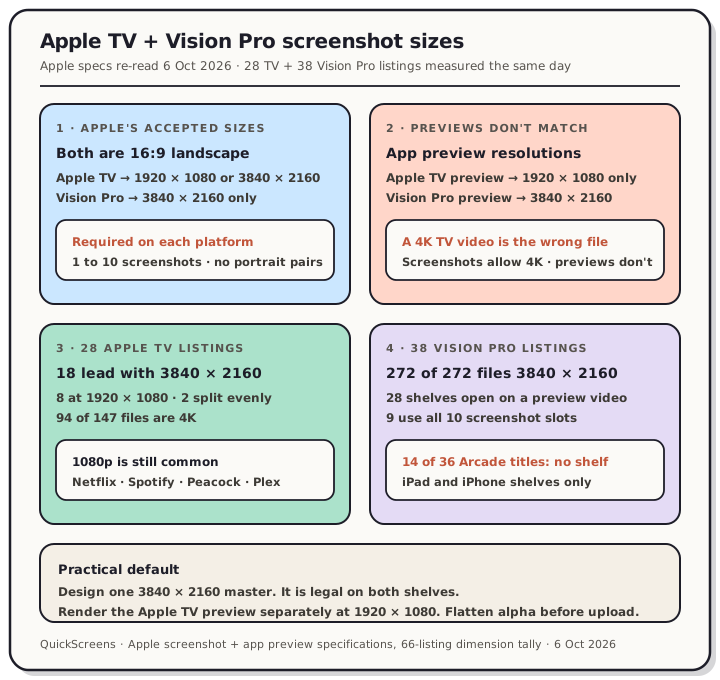
Read the chart description
Teardown from Apple's screenshot and app preview specifications re-read 6 October 2026, plus 28 Apple TV and 38 Vision Pro listings measured the same day. Four panels: Apple's accepted sizes, the preview video split, the Apple TV field tally, and the Vision Pro field tally.
What Apple accepts
Both blocks on the specifications page are short:
| Platform | Accepted screenshot sizes | Requirement line |
|---|---|---|
| Apple TV | 1920 × 1080, 3840 × 2160 | "Required for Apple TV apps" |
| Apple Vision Pro | 3840 × 2160 | "Required for Apple Vision Pro" |
The page-wide rules apply too. You need at least one screenshot and can upload up to 10 per device size, as .jpeg, .jpg or .png, and Apple's note is the same one every platform gets: "Images can't include alpha channels or transparencies."
There are no portrait sizes in either block, no notes about scaling and no list of device generations. Compare that with iPhone, where each display class names a fallback class (the 6.9" gotchas walk through that chain). On TV and Vision Pro you upload the set you want shown. There's nothing for Apple to fill in.
The preview video plays by a different rule
This is the line most likely to cost you an upload. On the app preview page, the Apple TV block lists one accepted resolution: 1920 × 1080, landscape. The 3840 × 2160 that's fine for TV screenshots isn't on it. Vision Pro previews are 3840 × 2160, matching its screenshots.
| Asset | Apple TV | Apple Vision Pro |
|---|---|---|
| Screenshots | 1920 × 1080 or 3840 × 2160 | 3840 × 2160 |
| App preview | 1920 × 1080 only | 3840 × 2160 |
| Orientation | Landscape | Landscape |
The rest of the preview spec is shared across platforms: up to three previews per supported device size and language, 15 to 30 seconds, 30 fps maximum, 500 MB, H.264 or ProRes 422 HQ. Apple's page says tvOS and visionOS previews are landscape only.
Display order is worth a note. Apple says previews "always appear before screenshots on iPhone, iPad, Mac, and Apple TV". Vision Pro isn't in that list. In our sample it made no difference: all 28 Vision Pro shelves that carried a preview showed it first on the web product page. If you're deciding whether a preview is worth producing at all, preview video vs screenshots covers the cost side.
What 28 Apple TV listings upload
We took 28 apps with a tvOS version (streaming, music, sports, utilities and three games), read their Apple TV screenshot lists through Apple's public lookup API, and measured every file at full resolution. Separately, we read the width and height fields in each apps.apple.com product page's Apple TV shelf. The two methods agreed on all 147 files.
| Primary size (the mode of each shelf) | Listings |
|---|---|
| 3840 × 2160 | 18 |
| 1920 × 1080 | 8 |
| Even split between the two | 2 |
By file count, 94 of 147 screenshots were 4K and 53 were 1080p. The 1080p group isn't made up of small apps: Netflix, Spotify, Peacock, Plex, Twitch, Fubo, Swiftfin and Night Sky all ship their whole TV shelf at 1920 × 1080. Disney+, HBO Max, Hulu, YouTube, Paramount+, ESPN, Infuse and Apple's own Developer app are at 3840 × 2160.
Four listings mix the two sizes on one shelf: Prime Video (5 at 4K, 1 at 1080p), Moonlight (2 and 1), YouTube TV (2 and 2) and Tubi (1 and 1). Connect evidently accepts a mixed set, because those are live. They're also the exception: 24 of 28 keep every file on one size.
So both sizes are normal in the field. If you have 4K source material, the 4K slot is there. If your capture pipeline tops out at 1080p, you're in company Apple clearly accepts.
What 38 Vision Pro listings upload
There's only one legal size, so the interesting question isn't the size. It's who has a Vision Pro shelf at all.
We started from 68 product pages: all 36 games on Apple's Vision Pro Arcade page as of 6 October, plus 32 apps we expected to have a visionOS version. 38 had a native Vision Pro screenshot shelf. Across them we counted 272 screenshots, and all 272 were 3840 × 2160. Nobody uploaded anything else, which is what you'd expect from a one-size spec.
Two other numbers from those 38:
- 28 opened with a preview video. 27 had one preview and djay had three, the maximum Apple allows.
- 9 used all 10 screenshot slots, mostly games (Crossy Road Castle, Cut the Rope 3, Synth Riders, What the Golf?).
The finding we didn't expect: 14 of the 36 games on Apple's own Vision Pro Arcade page had no Vision Pro shelf. Their pages showed iPad and iPhone screenshots only. That's allowed. Apple's Vision Pro availability page says your iPhone and iPad apps "will be available to users on Apple Vision Pro unless you edit their availability in App Store Connect." So the 3840 × 2160 set only comes into play once you add a visionOS version. Until then, someone browsing on a headset sees your iPad art, which means the iPad 13" set is quietly doing a second job.
Capturing on Vision Pro
Apple's guide to capturing screenshots and video for 2D viewing is specific about a few things:
- Turn on high-quality recording (Settings, General, Captures & Recordings). Normal rendering is foveated for the wearer, which looks wrong on a flat screen. High quality captures unfoveated content from a single eye.
- Recordings cap at three minutes in that mode and exclude microphone audio.
- Screenshots come from pressing the Digital Crown and top button together, or asking Siri, and land in Photos.
- Keep the subject centred. Apple warns that "the aspect ratio of screenshots crops content that appears at the sides of an experience."
- Watch the room. Apple says to avoid capturing people, screens, branded products, logos and artwork you don't have permission to use.
The guide doesn't publish the pixel size of a device capture, so check the file before you upload it. If it isn't exactly 3840 × 2160, compose it onto a 4K canvas instead of stretching it.
Two tvOS images that aren't screenshots
People searching for Apple TV sizes often mean one of these, and neither goes in the screenshot slots.
- Top Shelf image. Apple's Top Shelf guidance gives the static image as 2320 × 720 pt (4640 × 1440 px at @2x). It ships inside your app, not in the App Store listing.
- App icon. The app icon guidance lists tvOS as a landscape rectangle with an 800 × 480 px layout, built from two to five parallax layers in an Xcode image stack.
What to do
- Design one 3840 × 2160 master. It's legal for Apple TV and the only legal size for Vision Pro.
- Export 1920 × 1080 for the Apple TV preview video, and only for that, unless your whole TV shelf is 1080p by choice.
- Keep each shelf on one size. 24 of 28 TV listings did, and Vision Pro gives you no other option.
- Flatten alpha in both sets (the rules post has the details).
- Don't expect a visionOS shelf from an iPad build. Until you ship native, your iPad screenshots stand in.
If the same app also ships phone, iPad and Mac sets, you can build those in QuickScreens. Its 1920 × 1080 landscape export is also a legal Apple TV screenshot size. It doesn't have a TV or Vision Pro frame, or a 4K preset, yet.
Frequently asked questions
What size are Apple TV screenshots? 1920 × 1080 or 3840 × 2160, landscape, per Apple's specifications page (re-read 6 October 2026). Screenshots are required for Apple TV apps.
What size are Apple Vision Pro screenshots? 3840 × 2160 only. All 272 Vision Pro screenshots we measured across 38 listings were that size.
Can an Apple TV app preview be 4K? No. Apple's app preview page lists 1920 × 1080 landscape as the only accepted Apple TV preview resolution. Vision Pro previews are 3840 × 2160.
How many screenshots can I upload for Apple TV or Vision Pro? One to ten per device size, plus up to three app previews per device size and language.
Do I need Vision Pro screenshots if my iPad app runs on Vision Pro? Not until you add a visionOS version. Apple makes iPhone and iPad apps available on Vision Pro by default, and those listings show their iPad and iPhone screenshots. In our sample, 14 Arcade games on Apple's Vision Pro page had no Vision Pro shelf at all.
Should Apple TV screenshots be 4K or 1080p? Apple accepts both, and the field is split: 18 of 28 listings we measured lead with 4K and 8 use 1080p throughout. We have no conversion data either way. The full cross-platform table is on the App Store screenshot sizes reference.