August 19, 2026 · 13 min read
How often you can update store screenshots
Apple gates your live screenshots behind a new app version. Google Play doesn't. We read both stores' docs and measured how often 100 top listings ship.
On the App Store, you cannot change the screenshots on your live product page by editing them. Apple's own help page says it in one sentence: "Once your app is submitted for review and approved, you must create a new version to update the screenshots." On Google Play, screenshots are a store listing change with no release attached to it, so you edit, send for review, and the listing updates on its own.
That's the whole difference, and it decides how often each store lets you change your mind.
There's one documented route around Apple's gate, and it lives inside the A/B testing feature. We also measured how often 100 top-charting US listings actually ship a version, because on iOS that number sets the ceiling on how often the free route is available to you.
Read the chart description
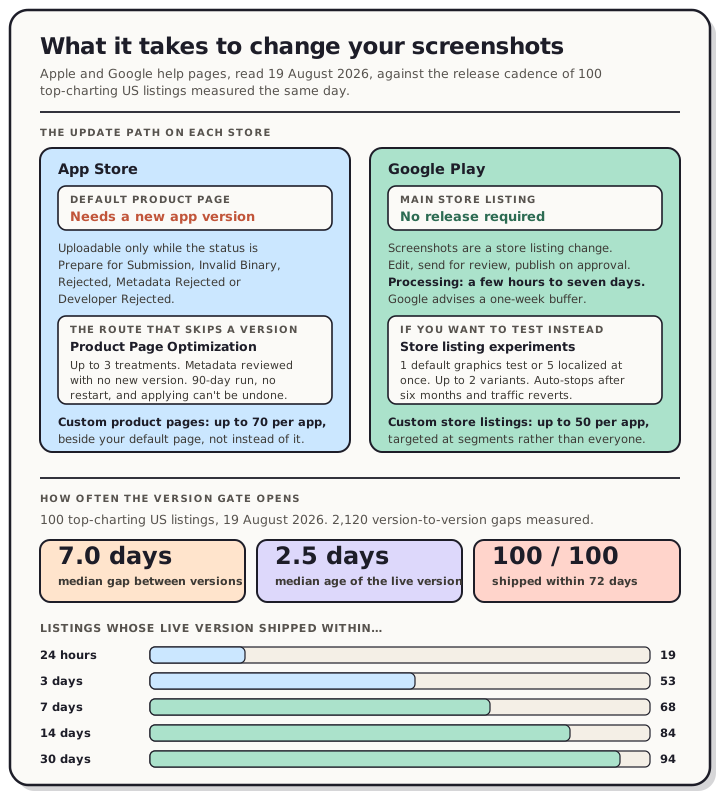
Panel one shows the update path on each store, from Apple and Google help pages read 19 August 2026. On the App Store the default product page is version scoped: to change live screenshots you create a new app version and submit it, and screenshots can only be uploaded while the app status is Prepare for Submission, Invalid Binary, Rejected, Metadata Rejected or Developer Rejected. The one documented route that skips a new version is Product Page Optimization, which allows up to 3 treatments per test, lets treatment metadata be submitted for review without a new app version, runs for 90 days or until stopped, cannot be restarted once stopped, and cannot be undone once a treatment is applied to the live page. Custom product pages are a separate feature capped at 70 per app. On Google Play the store listing is its own change stream: edit the screenshots, send them for review, and processing takes a few hours or up to seven days. Store listing experiments allow one default graphics experiment or up to five localized experiments at the same time, with up to 2 variants against the current listing, stopping automatically after six months. Custom store listings are capped at 50 per app. Panel two shows release cadence measured on 19 August 2026 across 100 top charting United States listings, covering 2,120 version to version gaps. The median gap between consecutive versions is 7.0 days. Days since the current version shipped: 19 of 100 within 24 hours, 53 within 3 days, 68 within a week, 84 within two weeks, 94 within 30 days, and all 100 within 72 days.
Apple: the screenshots belong to the version
Apple's upload page lists the app statuses that let you touch screenshots at all: Prepare for Submission, Invalid Binary, Rejected, Metadata Rejected, Developer Rejected. Every one of those is a state your app is in before a version goes live. Once it's live, the same page closes the door with the sentence quoted above.
There's a second way to see this. Apple keeps a reference page called Required, localizable, and editable properties, which exists to tell you which properties "can be localized and edited at any time without submitting a new version of your app." Its Platform version information table runs from Support URL down to Reset overview rating. Screenshots don't appear on that page at all. Neither do Keywords or Promotional Text. We searched the raw HTML on 19 August 2026 and each of those three strings appears zero times.
The property that is built for changing your mind is Promotional Text, and Apple describes it exactly that way: it "lets you inform your App Store visitors of any current app features without requiring an updated submission." It's capped at 170 characters and it's text. Nothing in the image slots works like that.
One more line from the new version page, worth reading before you swap a set you like for one you're unsure about: "it's not possible to revert to a previous version on the App Store if you have an issue with your app. You must create and submit a new version."
The one route that skips a new version
Product Page Optimization is Apple's A/B testing feature, and its setup instructions carry the line that changes the answer. From Configure test treatments: "Before testing, ensure all metadata in your test treatments is approved. You can submit this metadata without submitting a new version of your app."
So new screenshots can get through App Review with no build attached. And then, from Apply a test treatment to your product page: "You can apply any of the treatments to your original product page on the App Store, as well as to versions in the Ready for Distribution or Prepare for Submission states, at any time."
Put those together and PPO is a supported way to change your live screenshots between releases. It's a testing feature doing a publishing job, which is probably why it rarely gets described this way, but Apple documents both halves plainly. What the help pages don't say is whether a test has to run before you can apply a treatment, so we're not going to tell you it works as a pure publishing shortcut. We haven't tried it.
The rules you're signing up for:
| Apple Product Page Optimization | Play store listing experiments | |
|---|---|---|
| What you can vary | app icon, screenshots, previews | icon, feature graphic, screenshots (plus descriptions on localized tests) |
| Variants | "up to three treatments per test" | "up to 2 variants" against the current listing |
| Concurrency | not stated in the help pages | "one default graphics experiment or up to five localized experiments at the same time" |
| Duration | "runs for 90 days or until you manually stop it" | "stop automatically after running for 6 months" |
| Restart | "Once you stop a test, it can't be restarted" | not stated |
| Results threshold | "after there are five first-time downloads" | statistical result against your chosen metric |
| Where it works | iOS 15 and iPadOS 15 or later | not stated |
| Not available for | custom product pages, Apple Watch, iMessage | n/a |
Two Apple details that bite. Applying a treatment "can't be undone", and if you apply while a test is running "the test will automatically stop." And only the images move across: "only the app previews and screenshots from the treatment will be applied. To apply changes to the app icon, set it as the default icon in your next app version."
One shortcut is free. Apple says if you're "simply changing the order of screenshots or previews that are already on the App Store, or only modifying the app icon, your metadata is already approved and you don't need to resubmit." Reordering a set you've already had approved is not a new-metadata event.
Custom product pages are a different tool for a different job. Apple allows "up to 70 custom product pages per app", each with its own screenshots, previews, promotional text and keywords, each on its own URL. They don't replace your default page, they sit beside it. Useful for a campaign, useless for fixing screenshots that are wrong for everybody.
Google Play: the listing has its own review queue
Play doesn't tie screenshots to a release. Google's publishing overview page lists "Updates to your store listings" as one change type among several, sent for review when you click Send for review, published on approval. No AAB is involved.
The cost is time, and Google publishes the number: "All app changes need to be processed before they can be published. Processing can take a few hours or up to seven days (or longer in exceptional cases)." Their own advice is a "buffer period of at least a week between submitting your app and going live."
If you want to test rather than just change, Play's store listing experiments run on the listing directly. One default graphics experiment or up to five localized ones at a time, up to two variants against your current listing, measured on unique user install clicks, open clicks, or pre-registration clicks. Google renamed global experiments to default graphics experiments, so older guides using the old name are describing the same thing. If you're running these per language, our notes on localizing store screenshots cover which parts of a set are worth translating. They also expire. Experiments "stop automatically after running for 6 months", after which "traffic will revert to the current listing."
For segmenting rather than testing, Play caps custom store listings at 50 per app, against Apple's 70 custom product pages.
How often the top 100 actually ship
On iOS the free route to new screenshots is a new version, so the practical question is how often that door opens. We measured it.
Sample: the 50 entries in Apple's US Top Free Apps feed and the 50 in the US Top Free Games feed, read 19 August 2026, 100 unique app IDs. For each listing we read the Version History shelf out of the product page and pulled every version string and release timestamp it carries.
The numbers:
| Value | |
|---|---|
| Version-to-version gaps measured | 2,120 |
| Median gap between consecutive versions | 7.0 days |
| Median days since the current version shipped | 2.5 |
| Shipped within 24 hours | 19 of 100 |
| Shipped within 7 days | 68 of 100 |
| Shipped within 30 days | 94 of 100 |
| Longest time since a current version shipped | 71.2 days |
| Median versions shipped in the last 90 days | 12 |
Every listing in the top 100 shipped a version in the last 72 days. For an app at this cadence, Apple's version gate is not a gate. If you ship weekly, you can change your screenshots weekly for free, and PPO is worth using for what it was built for rather than as a workaround.
The apps chart runs faster than the games chart: median 1.9 days since the current version, median gap 6.9 days, 39 of 50 shipped in the last week. Games: median 6.0 days, median gap 9.7 days, 29 of 50 in the last week. The slowest cadence in the sample belongs to Call of Duty: Mobile at a 67.5-day median gap between versions.
Two limits on this data, both worth stating. Apple truncates the Version History shelf at 25 entries; 79 of the 100 listings hit that cap, and their 25 entries span a median of 182 days, so any count over a long window is a floor rather than a total. And this measures releases, not screenshot changes. It tells you how often each listing could have swapped its screenshots, never whether it did.
We validated the parse before trusting it. On 99 of the 100 listings the newest Version History entry's version string and timestamp match the iTunes lookup API's current version exactly. The hundredth is Google Chrome, whose version string carries a leading space in the page data and matches on the timestamp. One listing, 7 Brew Coffee, has no Version History shelf at all, because it has only ever shipped version 1.0.0.
A signal that looks useful and isn't
If you go looking for when a competitor last changed their screenshots, the obvious idea is to read the Last-Modified header off the image on Apple's CDN. Don't. We tested it.
We took one screenshot source URL from each of 20 listings in the sample and requested each at three derivative sizes. All 20 returned more than one distinct Last-Modified across the three sizes. Several returned the timestamp of our own request, to the second. The header records when Apple's image service rendered that particular derivative, and has nothing to do with when the developer uploaded the file. On one source image the three timestamps spanned 39.5 days.
There's no public timestamp on store screenshot assets. Nobody outside App Store Connect or Play Console can tell you how fresh a listing's screenshots are.
So how often should you change them
We're not going to tell you that refreshing your screenshots every N weeks lifts installs by some percentage. Neither store publishes conversion data on screenshot changes, we haven't run a controlled test, and anyone quoting you a figure for it is guessing.
What the mechanics support:
- On Play, change them whenever they're wrong. There's no release to wait for and no test to run. Budget a week.
- On iOS, ride your release train. If you ship every few weeks, screenshots are effectively editable at that rhythm and cost you nothing extra.
- If you ship rarely, PPO is your route. It's the only documented way to get new screenshots onto a live product page without a version, and the review happens without a build.
- Reordering is free on iOS. Already-approved images in a new order need no resubmission, and the first tile is the one that carries your search card.
- Change them when the app changed. New UI, a renamed feature, a new device class, a seasonal push. Those are reasons. A calendar is not.
- Get the sizes right before anything else. A refresh you have to redo because the export was wrong costs you a whole release cycle on iOS.
Both stores treat a screenshot change as a reviewed change, so plan it like a release rather than a website edit, and check it against the rules that get screenshots rejected before you send it.
FAQ
Can I change App Store screenshots without submitting a new version? Yes, through Product Page Optimization. Apple's help says treatment metadata "can submit this metadata without submitting a new version of your app", and an approved treatment can be applied to your live product page at any time. Editing the screenshots on the live version directly is not possible: "Once your app is submitted for review and approved, you must create a new version to update the screenshots."
Can I change Google Play screenshots without a new release? Yes. Store listing updates are their own change on Play's Publishing overview page and go through review independently of any release. Google says processing takes "a few hours or up to seven days (or longer in exceptional cases)."
How many screenshot variants can I test? Apple allows up to three treatments per Product Page Optimization test. Google allows up to two variants against your current listing, with one default graphics experiment or up to five localized experiments running at once.
How long do the tests run? Apple's runs 90 days or until you stop it, and a stopped test can't be restarted. Google's stop automatically after six months and traffic reverts to the current listing.
Does reordering screenshots need a review? Not on iOS if the images are already approved. Apple: "If you're simply changing the order of screenshots or previews that are already on the App Store... your metadata is already approved and you don't need to resubmit."
How often do top apps update their screenshots? Nobody outside the consoles can measure that, and the CDN timestamps that look like an answer are derivative render times. What is measurable is release cadence, and in our 19 August 2026 read of the US top 100, the median gap between versions was 7.0 days.
Can I roll back a screenshot change? Not directly. Applying a Product Page Optimization treatment "can't be undone", and Apple's own note on versions is that reverting isn't possible without submitting again. On Play you'd edit the listing back and go through review a second time.
The part you control is whether the new set is right the first time. Open the editor, rebuild your screens, and export every size both stores accept. Sizes for both are on our App Store screenshot sizes and Google Play screenshot sizes pages, and if you're deciding what goes in the set, start with the first three screenshots.