September 7, 2026 · 7 min read
Custom Product Pages for screenshots: 70 URLs, one size matrix
Apple lets you publish up to 70 Custom Product Pages with their own screenshots and URLs. The hard part is regenerating every size for each page.
Apple's Custom Product Pages let you publish up to 70 additional versions of your App Store product page for iPhone and iPad. Each one can vary screenshots, promotional text, and/or app previews, gets a unique URL you can share, and can be assigned keywords so it appears in search for those terms instead of your default page.
That is the marketing pitch. The production reality is quieter: every page that changes screenshots still has to satisfy the same size and review rules as a normal listing upload. A seasonal campaign is not one file. It is another full set across every required display class.
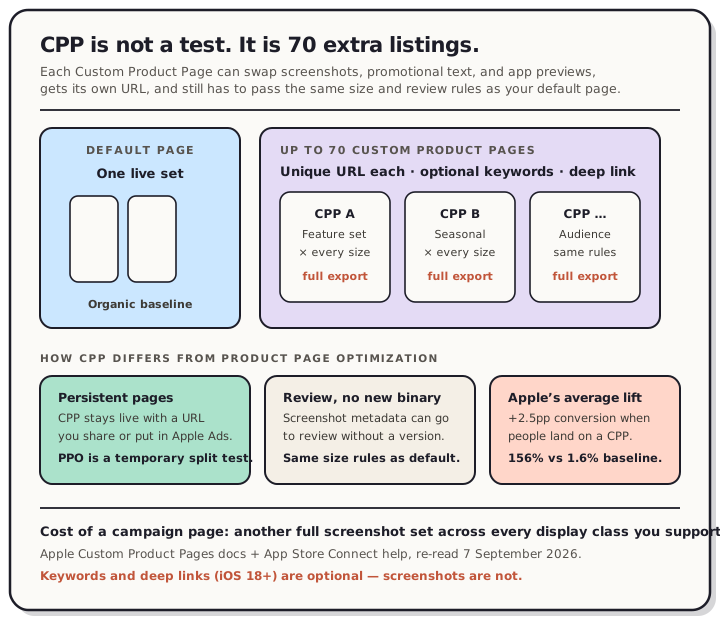
Read the chart description
Diagram comparing default App Store page, up to 70 Custom Product Pages with unique URLs, and Product Page Optimization treatments. Sourced from Apple Custom Product Pages docs, read 7 September 2026.
Custom Product Pages vs Product Page Optimization
These two tools get mixed up because both live in App Store Connect and both can swap screenshots. They are not the same job.
| Custom Product Pages | Product Page Optimization | |
|---|---|---|
| Purpose | Persistent alternate pages with unique URLs | Temporary A/B test against the default page |
| Cap | Up to 70 additional pages | Up to 3 treatments vs original |
| Traffic | People you send (ads, email, deep links) + optional assigned keywords in search | Random split of organic App Store traffic |
| Lifespan | Stays live until you change or remove it | One test at a time, up to 90 days |
| Screenshot cost | One full size matrix per page | One full size matrix per treatment |
If you need a durable URL for a March Madness campaign, an RPG-focused ad creative, or a feature launch, that is CPP. If you need to know whether caption A beats caption B for everyone who finds you organically, that is Product Page Optimization.
Apple's own Custom Product Pages page is the primary source. Re-read on 7 September 2026: developers see a 2.5 percentage point average conversion increase when referring people to a custom product page — Apple frames that as a 156% lift versus a 1.6% average conversion rate on default pages. Those are Apple's aggregates, not a guarantee for your app.
What you can change on a CPP (and what still binds you)
Per Apple, each custom page can vary:
- Screenshots — same upload rules as the default page (no alpha, exact display sizes).
- Promotional text — the short field that can update without a new version.
- App previews — same accepted sizes and review path as listing video.
You can also:
- Assign keywords so that custom page appears in search for those terms (each keyword combination unique to one page; match the page's intent).
- Assign a deep link (iOS 18 / iPadOS 18 or later) so Open lands on a specific destination inside the app.
- Submit metadata for review independent of an app update, including screenshots, as long as Review Guidelines and screenshot specs are followed.
- Use the page ID with Apple Ads, StoreKit overlays, and
SKStoreProductViewController.
What does not relax: the screenshot size and upload rules. A CPP that changes only the first screenshot still needs compliant files for every display size you support. Change a caption for a campaign, and you re-export the size ladder again. That is the same matrix problem as localizing store screenshots and PPO treatments, except now the variants are audiences and campaigns instead of languages or hypotheses.
A page design that survives the export cost
Keep each CPP narrow enough that regenerating the set is worth the conversion lift.
Good first pages
- One feature story: screenshots and promo text aimed at that feature, deep-linked to it on iOS 18+.
- One seasonal or content beat (Apple's CBS Sports March Madness example): creative that matches the outbound ad, not a total brand redesign.
- One audience (Apple's State of Survival RPG example): screenshots that continue the ad creative into the store card.
Usually too expensive for one launch
- Rewriting every screenshot for every language for every CPP at once. Localize the pages you will actually promote.
- Building 70 pages on day one. Apple's cap is a ceiling, not a quota. Start with the two or three URLs your ads and email already need.
- Mixing a brand-new icon story into CPP creative when the binary does not already contain those assets — icons still follow the published-binary rules when they are part of the product page experience you are testing elsewhere.
Operational checklist
- Duplicate the default set in your layout tool, change only the story for that audience, export every required size with no alpha.
- Create the CPP in App Store Connect (blank or copy of default), upload the set, set promo text, optional keywords and deep link.
- Submit for review. Do not point paid traffic at a page that is still In Review.
- Wire the unique URL into Apple Ads, email, or StoreKit. Measure in App Analytics → Acquisition (impressions, downloads, conversion, retention, proceeds per paying user vs default).
- Retire or refresh pages that stop earning. A stale seasonal set with last year's event creative is worse than the default page.
Search cards still punish a weak first frame. Apple may show only your first one to three screenshots in search when a CPP is eligible, which is why we measured that surface in the first three screenshots. Caption type that looks fine at full size often collapses at the size the store paints; see caption size.
The honest product takeaway
Custom Product Pages are free storefront real estate Apple already gave you — up to seventy extra doors into the same app. The reason most indie teams ship zero of them is not the analytics UI. It is the screenshot factory sitting behind each URL.
If spinning up a campaign page still means rebuilding frames by hand for every iPhone and iPad class, the rational move is to keep sending paid traffic to the default listing. If your layout system can duplicate a set, swap the story, and regenerate the size matrix, CPP becomes a normal part of a feature launch or ad campaign instead of a quarter-long side project.
That regeneration loop is what QuickScreens is for. Build the default set once, branch a custom page, change the thing that audience cares about, and export every size without starting over.
Frequently asked questions
Is a Custom Product Page the same as Product Page Optimization? No. CPP is a persistent alternate page with its own URL. PPO randomly splits organic traffic across temporary treatments to improve the default page. See our PPO screenshot guide.
Do CPP screenshots need a new app version? Not by themselves. Apple says custom product page metadata, including screenshots and app previews, can be submitted for review independent of an app update.
How many Custom Product Pages can I create? Up to 70 additional versions for iPhone and iPad, per Apple's Custom Product Pages documentation (re-read 7 September 2026).
Can a CPP appear in App Store search? Yes, when you assign keywords to it. Apple says the page can appear in search for those keywords instead of the default page, and that each keyword combination should be unique to a single product page.
Do Custom Product Pages work with Apple Ads? Yes. Apple Ads can point Search tab, Today, and search-results creatives at a specific custom product page, including deep links on supported OS versions.
Does Google Play have the same tool? Play has custom store listings and store listing experiments. Similar idea — audience-specific creative and tests — different console and caps. The screenshot lesson is the same: budget a full size export for every listing you intend to keep live.