July 16, 2026 · 7 min read
App Store screenshot best practices for indie developers
Store screenshot practices with the measurements behind them: what each store actually displays, the caption size that survives, and the sizes to export.
Most screenshot advice is about design. The rules that decide whether your work lands are the store's, and they can be measured. Two of them matter more than anything on a style checklist: the App Store draws your screenshot about six times smaller than you drew it, and on Google Play the search card usually shows a different asset entirely.
Everything below is ordered by how much it moves the outcome. Where we have measured a number ourselves, it's cited and dated.
Read the chart description
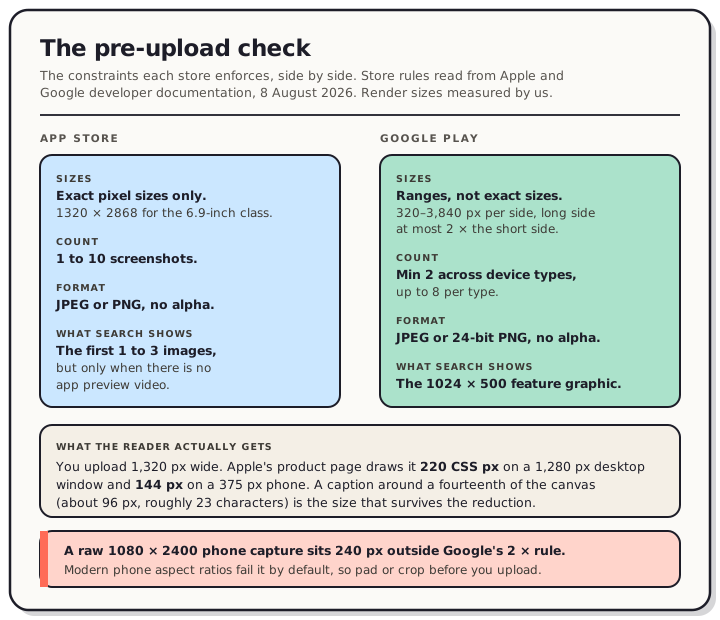
A two-column comparison of the hard constraints each store places on screenshots. App Store: exact pixel sizes only, such as 1320 by 2868 for the 6.9-inch class; one to ten screenshots; JPEG or PNG with no alpha channel; and in search results the first one to three images appear, but only when the listing has no app preview video. Google Play: ranges rather than exact sizes, 320 to 3,840 pixels per side with the long side no more than twice the short side; a minimum of two screenshots across device types and up to eight per type; JPEG or 24-bit PNG with no alpha; and in search the card shows the 1024 by 500 feature graphic rather than a screenshot, which was true for 21 of 30 listings measured. A lower panel notes that a 1320 pixel wide upload is drawn 220 CSS pixels wide on a 1280 pixel desktop window and 144 pixels on a 375 pixel phone, so a caption of about a fourteenth of the canvas, roughly 96 pixels and 23 characters, is the size that survives. A final warning states that a raw 1080 by 2400 phone capture sits 240 pixels outside Google's two-times rule.
Start from what the store displays
Design decisions get much easier once you know the size your work is shown at.
On the App Store, we measured the product page on 6 August 2026. A screenshot renders 220 CSS pixels wide on a 1,280 pixel desktop window, 144 on a 375 pixel phone, and 260 on a 1,440 pixel window. Upload the 1,320 pixel file Apple asks for and it's reduced six times on desktop, over nine times on mobile web. The box belongs to Apple, not to you: three apps that uploaded different file sizes all rendered at the same 220 pixels. Nothing gets cropped, so the whole image is scaled and shown.
On Google Play the picture is stranger. We checked 30 listings across three queries on 5 August 2026, and not one search card showed a screenshot. Twenty-one showed the 1024 × 500 feature graphic and nine showed a promo video thumbnail. Screenshots only appear once someone opens the listing, and there a 1,080 pixel file draws about 115 CSS pixels wide.
So the first practical rule is a split one. On Apple, your first screenshot is a search asset. On Play, your feature graphic is.
Message and order
Make the first screenshot carry the whole pitch. Apple's documentation says the first one to three images appear in search results when no app preview is available, and the count depends on orientation. Assume image one is the only one anyone sees, and let it answer "what is this" on its own.
Give the feature graphic real thought if you ship on Play. Google requires one before you can publish, so you're making it either way. Our measurement says it's also the asset most people see first. Treat it as the headline, not as a box to tick. There's a full breakdown of the 1024 × 500 canvas if you want the crop geometry.
One idea per screenshot. A single claim a stranger gets instantly beats three they have to decode, and at 144 pixels wide they aren't decoding anything.
Sequence like a story. Hook, then how it works, then the payoff. Each screen should earn the swipe to the next.
Sell benefits, not features. "End-to-end encrypted" is a feature. "Only you can read it" is a benefit.
Craft and legibility
Size your captions off the render, not the canvas. Working from those measurements, a caption of roughly the canvas width divided by 14 survives the reduction. On a 1,320 pixel canvas that's about 96 pixels tall and buys you around 23 characters on a line. Longer headlines don't get read small, they get skipped.
Hold high contrast between text and background. Apple's page also requests an image smaller than the box it fills and stretches it, so fine detail softens further than the raw numbers suggest.
Use real, tidy content. Believable data builds trust. Empty states and placeholder text quietly signal "not finished".
Consistency and polish
Reuse one design system. Same palette, same font, same headline placement, so the set reads as one intentional listing rather than five unrelated exports.
Frame captures in real devices. A framed screen looks like a product. A bare capture looks like a bug report.
Localize when it matters. If a meaningful share of your users read another language, translated headlines beat English ones they skim past. One rule catches people out here: Apple requires the same screenshot size for Apple Watch across every localization.
Ship without rejections
The two stores check completely different things, which is where most last-minute uploads go wrong.
Apple wants exact pixel sizes. 1320 × 2868 for the 6.9-inch class, 2064 × 2752 for the required 13-inch iPad class, and so on through every class on our App Store size reference. One to 10 images, JPEG or PNG, and no alpha channel.
Google checks ranges instead: 320 to 3,840 pixels per side, with the long side no more than twice the short side. Minimum two screenshots across your device types, up to eight per type, JPEG or 24-bit PNG, no alpha. The Play size reference has the per-device-type table.
That 2× rule catches raw phone captures, which is worth knowing before upload day. When we captured Flutter apps on Android emulators, a 1080 × 2400 capture came out 240 pixels over the limit and a 1280 × 2856 capture 296 pixels over. That's a property of modern phone aspect ratios rather than of the emulator, so real devices produce the same thing. To be precise about what that means: those files fall outside Google's published spec. We haven't tested an upload, so we can't tell you what Play does with one.
Alpha is the other quiet trap. Android's adb screencap writes an 8-bit RGBA PNG even when every pixel is fully opaque, and both stores say no alpha channel. A raw capture can carry a channel you never see.
Then iterate. Your first set is a hypothesis, not a monument. When you ship an update, refresh the screenshots too. A sharper first image or a clearer headline is one of the cheapest changes available to an indie app, and it costs minutes once the resizing is automated.
FAQ
How many screenshots should I actually make? Three well-made ones beat eight rushed ones on Apple, since search shows at most the first three. On Play, aim for at least four at 1,080 pixels or larger, which is what Google asks for to be eligible for its promotional placements.
Do I need different designs for each store? The same designs, yes. Not the same files. Apple demands exact sizes while Google accepts a range, so one design system exported twice is the efficient route.
Does the bottom of my screenshot get cut off? Not on the App Store product page. We measured the rendered aspect ratio against the uploaded files and they match, so the whole image is scaled and shown. Top-weighting your caption is still the safer habit, because Apple's search card is laid out differently and we haven't been able to measure it.
Is a preview video worth it instead? On Apple it replaces your screenshots in search, so the poster frame becomes your search card. On Play, promo videos took over nine of the 30 cards we measured, five of those in the games query. Ship one if you can make it good, but a weak video costs you a working search card.
The tedious half of all this is exporting the same design at every size both stores demand. That's the part QuickScreens removes: design once, export a store-exact set for Apple and a spec-compliant set for Play in one pass.