September 28, 2026 · 7 min read
Mac App Store screenshot sizes: four canvases, zero native panels
Apple accepts exactly four 16:10 Mac sizes. Native MacBook panels miss all of them. 17 of 22 listings we measured still upload at 2880 × 1800.
Apple's Mac screenshot rule is shorter than the iPhone one, and easier to misread. There is no display-class ladder, no portrait pair, and no "upload your laptop's native resolution" escape hatch. You pick one of four landscape 16:10 sizes. That is the whole requirement.
We re-read Apple's screenshot specifications as raw HTML on 28 September 2026, measured the screen apertures in our MacBook Pro bezels, and pulled the live media shelves for 22 Mac App Store listings the same day. The numbers below are documentation and measurement. Neither store publishes install lift by Mac canvas size.
Read the chart description
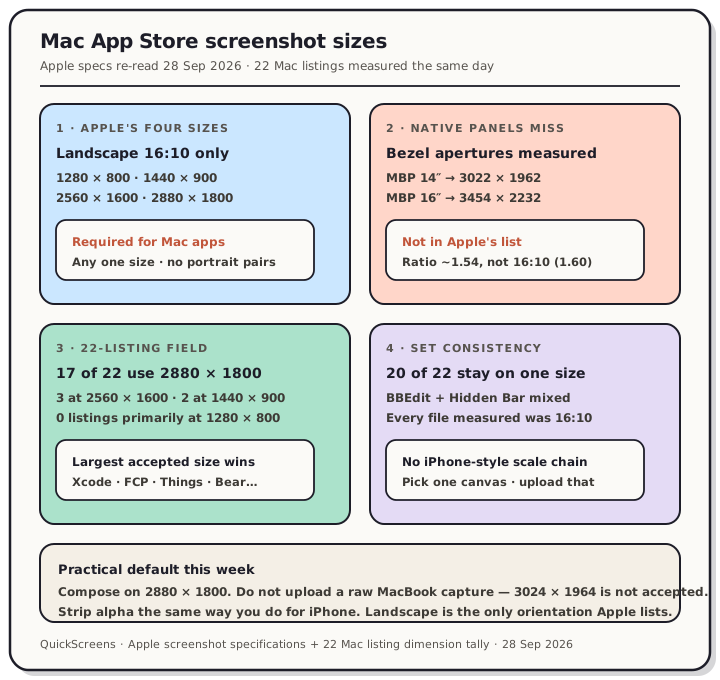
Teardown from Apple screenshot specifications re-read 28 September 2026 and a 22-listing Mac App Store sample. Panel one: Apple accepts exactly four landscape 16:10 sizes, 1280 by 800, 1440 by 900, 2560 by 1600, and 2880 by 1800, required for Mac apps. Panel two: measured MacBook Pro bezels show 14 inch aperture 3022 by 1962 and 16 inch aperture 3454 by 2232, neither accepted and neither 16:10. Panel three: of 22 Mac listings, 17 primary at 2880 by 1800, 3 at 2560 by 1600, 2 at 1440 by 900, zero primary at 1280 by 800. Panel four: only two listings mixed sizes inside one set; every measured file was 16:10.
Apple's four sizes, and nothing else
Under the Mac block on the specifications page, Apple lists exactly four accepted dimensions:
| Accepted size | Aspect |
|---|---|
| 1280 × 800 | 16:10 |
| 1440 × 900 | 16:10 |
| 2560 × 1600 | 16:10 |
| 2880 × 1800 | 16:10 |
The Requirement line is blunt: "Required for Mac apps." The intro sentence above the table says you upload one of those sizes with a 16:10 aspect ratio. There are no portrait swaps the way there are for iPhone and iPad. Landscape is the only orientation Apple publishes for Mac.
There is also no iPhone-style fallback chain. On iPhone, a missing 6.3" slot can fill from 6.5". On Mac, Apple does not document scaling from one accepted size to another. You supply a set at one accepted size, and that is what Connect has.
Format rules are the same sentence that covers every other platform on the page: .jpeg, .jpg, or .png, and "Images can't include alpha channels or transparencies."
A raw MacBook capture is the wrong file
This is the trap that looks like it should work. Current MacBook Pro panels are close to, but not on, Apple's list:
| Source | Measured size | 16:10? | Accepted? |
|---|---|---|---|
| MacBook Pro 14" bezel aperture (flood-filled) | 3022 × 1962 | No (~1.54) | No |
| MacBook Pro 16" bezel aperture (flood-filled) | 3454 × 2232 | No (~1.54) | No |
| Apple's largest accepted Mac size | 2880 × 1800 | Yes (1.60) | Yes |
We measured those apertures on 28 September 2026 by flood-filling the fully transparent screen region in our MacBook Pro 14" and MacBook Pro 16" bezel PNGs (frame assets 3944 × 2564 and 4340 × 2860). The holes land on the same family of numbers as Apple's published Liquid Retina XDR panels (3024 × 1964 and 3456 × 2234) — close enough to prove the point, and still not an accepted Connect size.
Common MacBook Air and desktop panels miss the list the same way: 2560 × 1664, 2880 × 1864, 4480 × 2520, and 5120 × 2880 are all real hardware resolutions and none of them appear in Apple's Mac screenshot block. Several are not even 16:10.
So a clean ⇧⌘4 capture from your shipping laptop is almost never a legal upload. You compose onto one of the four canvases, the same way an iPhone simulator capture has to land on an accepted display-class size.
What 22 Mac listings actually upload
We looked up 22 Mac apps through Apple's public lookup API on 28 September 2026 and fetched each listing's screenshot files at full resolution (CDN 2880x1800bb variants, which return the source dimensions when the upload is smaller). Primary size = the mode of that listing's Mac shelf.
| Primary upload size | Listings | Share |
|---|---|---|
| 2880 × 1800 | 17 | 77% |
| 2560 × 1600 | 3 | 14% |
| 1440 × 900 | 2 | 9% |
| 1280 × 800 | 0 | 0% |
The 2880 × 1800 group includes Xcode, Final Cut Pro, Logic Pro, GarageBand, iMovie, Pixelmator Pro, Things 3, CleanMyMac, Bear, DaisyDisk, Magnet, Tailscale, Spark Classic, Gifox 2, BetterSnapTool, and Apple Configurator — the largest accepted canvas is the default in this sample. Slack for Desktop and Remote Mouse sit on 2560 × 1600. Fantastical and Amphetamine use 1440 × 900. Nobody in the sample primarily ships 1280 × 800.
Twenty of twenty-two listings keep every file on one size. The two exceptions:
- BBEdit — 7 files at 2560 × 1600 and 3 at 2880 × 1800 inside the same shelf.
- Hidden Bar — 2 at 2880 × 1800 and 1 at 1280 × 800.
Every measured file was exactly 16:10. We did not see a portrait Mac screenshot in the sample, which matches Apple's table (no portrait pairs are published for Mac).
This is a fact about the charts, not proof that 2880 × 1800 converts better. Apple does not publish that number. What the sample does show is that the largest legal canvas is the one most Mac listings already maintain.
How Mac differs from the iPhone / iPad playbook
Three differences matter if you already ship phone screenshots and are adding a Mac shelf:
- Orientation is fixed. iPhone and iPad accept portrait and landscape pairs. Mac lists landscape only. Design the Mac shelf as a wide canvas from the start.
- There is no required "largest class" with a fallback chain. For iPad you must supply a 13" set and Apple scales down (Watch + iPad sizes). For Mac you pick any one of the four accepted sizes. The field still clusters on the largest.
- Native capture is farther from legal. An iPhone 17 Pro Max simulator write of 1320 × 2868 is already an accepted 6.9" size (6.9" gotchas). A MacBook Pro 14" capture around 3024 × 1964 is not accepted at all. The compose step is mandatory, not optional polish.
Alpha is unchanged. Simulator and design-tool PNGs still ship an invisible alpha channel that Connect rejects; flatten or export JPEG before upload (rules post).
What to do this week
- Pick 2880 × 1800 unless you have a reason not to. It is accepted, it matches most of our sample, and it gives captions the most source pixels before the store scales them down.
- Do not upload a raw laptop screenshot. Compose the UI onto a 16:10 canvas at one of the four sizes first.
- Keep the whole Mac shelf on one size. Twenty of twenty-two listings did. Mixing is legal in the sense that Connect accepted those two outliers, but it is the exception.
- Strip alpha the same way you already should for iPhone and Play.
- Ignore portrait Mac layouts. Apple does not list portrait Mac screenshot dimensions on the specifications page we re-read today.
Build the Mac set once in QuickScreens on a MacBook frame, export at a store-exact 16:10 size, and skip hand-managing the four-row matrix.
Frequently asked questions
What size are Mac App Store screenshots? One of 1280 × 800, 1440 × 900, 2560 × 1600, or 2880 × 1800. All four are landscape 16:10. Apple's page (re-read 28 September 2026) marks them required for Mac apps.
Can I upload a screenshot straight from my MacBook Pro? Not as-is. Our measured 14" and 16" apertures (3022 × 1962 and 3454 × 2232) are not in Apple's accepted list and are not 16:10. Compose onto an accepted canvas first.
Is portrait allowed for Mac screenshots? Apple's Mac block publishes no portrait dimension pairs. Every file in our 22-listing sample was landscape 16:10.
Which Mac size do most apps use? In our 28 September 2026 sample of 22 Mac listings, 17 used 2880 × 1800 as the primary size. That is a prevalence finding, not a conversion claim.
Do Mac screenshots scale down the way iPhone classes do? Apple does not document a Mac fallback chain on the specifications page. Supply one accepted size for the Mac shelf; do not assume a smaller upload fills a larger slot.
Does Mac screenshot size affect installs? We have no conversion data, and Apple does not publish any. Treat the choice as a master-asset decision. The full platform tables live on the App Store screenshot sizes reference.