July 14, 2026 · 9 min read
A pre-launch checklist for your app's store listing
The listing items that block your release, taken from Apple's and Google's own docs, separated from the ones that only cost you installs.
Most listing checklists mix two very different kinds of item: the ones that stop you publishing at all, and the ones that only cost you installs. The first group is short, and it's written down. Apple and Google each publish exactly which fields and assets a listing needs before it can go live, so you can check that half against their documentation instead of against somebody's opinion.
This checklist is sorted that way, blockers first. Every requirement below was read from Apple's and Google's own pages on 9 August 2026. The display measurements are ours.
Read the chart description
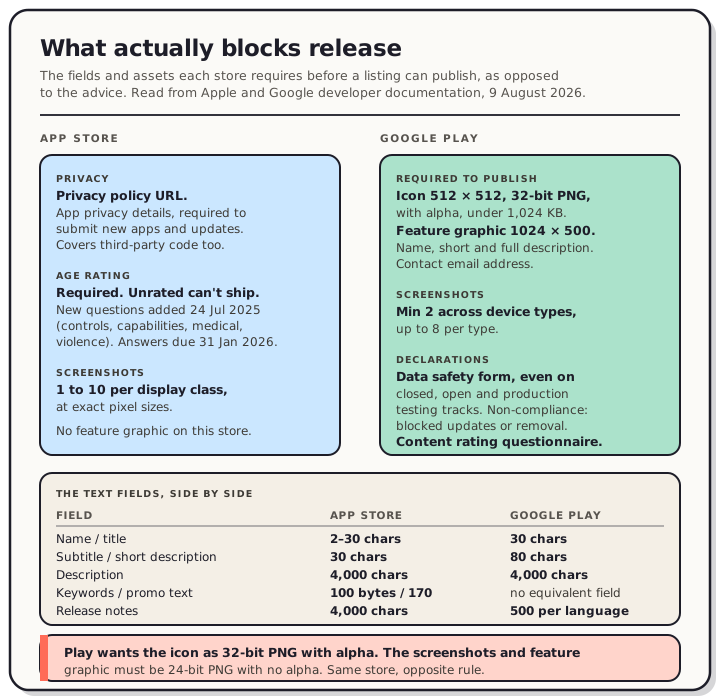
A two-column board separating the App Store and Google Play items that must exist before a listing can publish. App Store: a privacy policy URL, required for iOS and macOS apps; app privacy details in App Store Connect, which Apple states are required to submit new apps and app updates and which cover third-party code; an age rating, where an Unrated result cannot be published; answers to the age rating questions Apple added on 24 July 2025 covering in-app controls, capabilities, medical or wellness topics and violent themes, which Apple asked for by 31 January 2026; and one to ten screenshots at exact pixel sizes. Google Play: an app name of 30 characters, a short description of 80 and a full description of 4,000; a contact email; an app icon at 512 by 512 as 32-bit PNG with alpha under 1,024 KB; a feature graphic at 1024 by 500; a minimum of two screenshots across device types and up to eight per type; the Data safety form, required even for apps on closed, open and production testing tracks, where non-compliance means blocked updates or removal; and the content rating questionnaire. A lower strip lists the text field limits side by side: name 2 to 30 characters on Apple and 30 on Google, subtitle 30 against a short description of 80, description 4,000 on both, keywords 100 bytes on Apple with no equivalent field on Google, promotional text 170 on Apple with no equivalent, and release notes 4,000 on Apple against 500 Unicode characters per language on Google. A final warning states that Play wants the icon as 32-bit PNG with alpha but the screenshots and feature graphic as 24-bit PNG with no alpha.
What actually blocks release
App Store
- Privacy policy URL. Required for iOS and macOS apps. tvOS takes privacy policy text instead.
- App privacy details answered in App Store Connect. Apple's wording is that this information is required to submit new apps and app updates. It covers the third-party code you've integrated as well as your own, which is the part that catches people out on release day.
- Age rating. App Store Connect lists it as a required property, and an app that comes back Unrated can't be published on the App Store at all.
- The updated age-rating answers. Apple rebuilt this system on 24 July 2025, adding 13+, 16+ and 18+ to the existing 4+ and 9+, along with new required questions covering in-app controls, capabilities, medical or wellness topics, and violent themes. Apple asked for responses by 31 January 2026 to avoid an interruption when submitting updates in App Store Connect. That date has passed, so if you're reviving an app you haven't shipped in a while, answer these before you plan a release rather than in the middle of one.
- Screenshots. One to 10 per display class, at Apple's exact pixel sizes.
Google Play
- App name (30 characters), short description (80), full description (4,000). All three are required, and Google notes the limits apply the same way to full-width and half-width characters.
- Contact email address in your store settings.
- App icon. 512 × 512, 32-bit PNG with alpha, under 1,024 KB. Google's own phrasing: you must provide an app icon to publish your store listing.
- Feature graphic. 1024 × 500, with the same "must provide" language attached. Don't file this one under formalities; see the next section for why.
- Screenshots. A minimum of two across your device types, not two per type. You can add up to eight for each type you support.
- Data safety form. Required for every app published on Play, including apps on closed, open and production testing tracks. Google's stated enforcement for apps that don't comply is blocked updates or removal. An app that collects no data at all still has to complete the form and link a privacy policy.
- Content rating questionnaire, filled out in Play Console.
One trap hides inside that list. Play wants the icon as a 32-bit PNG with alpha, and the screenshots and feature graphic as 24-bit PNG without it. Same store, opposite rule, a couple of upload fields apart. Apple bans alpha on screenshots too, and a raw Android capture will hand you one whether you want it or not: adb screencap writes an 8-bit RGBA PNG even when every pixel is fully opaque.
The assets, sized off what each store shows
This is where the checklist stops being clerical. Both stores display your work far smaller than you make it, and on Play they often display something else entirely.
- First screenshot carries the pitch on its own. Apple's documentation says the first one to three images appear in search results when no app preview is available, and how many depends on orientation. Ship a preview video and the poster frame takes that job instead, since Apple says poster frames appear whenever videos don't autoplay.
- Captions sized for the render, not the canvas. We measured Apple's product page on 6 August 2026: a screenshot draws 220 CSS pixels wide in a 1,280 pixel desktop window and 144 pixels on a 375 pixel phone. Upload the 1,320 pixel file Apple asks for and it's reduced roughly six times on desktop and nine on mobile web. A caption around a fourteenth of the canvas width, about 96 pixels and 23 characters, survives that. Nothing gets cropped, so the whole image is scaled and shown.
- Feature graphic treated as your Play search asset. We checked 30 Play listings across three queries on 5 August 2026 and not one search card showed a screenshot. Twenty-one showed the 1024 × 500 feature graphic, nine showed a promo video thumbnail. Screenshots only turn up once someone opens the listing. The crop geometry of that canvas is worth ten minutes before you design it.
- Every required size exported at the store's spec, not resized by eye. Apple wants exact pixel dimensions per display class (full tables); Google wants a range, 320 to 3,840 pixels per side, with the long side no more than twice the short one (per-device-type table).
- Phone captures checked against Google's 2× rule. This one bites quietly. When we captured Flutter apps on Android emulators, a 1080 × 2400 capture came out 240 pixels over that limit and a 1280 × 2856 capture 296 pixels over. It's a property of modern phone aspect ratios rather than of the emulator, so real devices produce the same files. To be precise: those uploads fall outside Google's published spec. We haven't tested one, so we can't tell you what Play does with it.
- Four screenshots at 1,080 pixels or larger if you want to be eligible for Play's promotional placements, which is Google's stated bar for apps.
- Icon legible at thumbnail size, and distinct from the other icons it'll sit beside.
The words, with the real limits
Write to these numbers rather than to a guess. Both stores truncate silently.
| Field | App Store | Google Play |
|---|---|---|
| Name / title | 2 to 30 characters | 30 characters |
| Subtitle / short description | 30 characters | 80 characters |
| Description | 4,000 characters | 4,000 characters |
| Keywords | 100 bytes | no separate field |
| Promotional text | 170 characters | no separate field |
| What's New / release notes | 4,000 characters | 500 Unicode characters per language |
- Name and subtitle earn their 30 characters. You get one line each. Say what the app is, not what it's called.
- Keywords budgeted in bytes. Apple's wording is 100 bytes, not 100 characters. For an English list those are usually the same thing. For a localized one they may not be, so check the field rather than counting letters.
- First two lines of the description do the work, since that's what shows before anyone taps "more".
- Promotional text used for what it's for. You can change those 170 characters without submitting a new build, which makes it the right home for a sale or a launch note and the wrong home for keywords.
- What's New written for humans, and written twice if you ship on both stores. Apple gives you 4,000 characters here. Google gives you 500 per language. "Bug fixes and improvements" wastes a field that people deciding about your app do read.
- Copy proofread. Typos in a listing read as sloppiness in the app.
Before you submit
- Category is the one your users would browse, not the most flattering one.
- Support URL and contact work and point somewhere real.
- Build matches the listing. Version number right, screenshots showing the UI you're actually shipping.
- Listing previewed at real size, on a phone. Everything looks fine at 100%; the truncation and the unreadable caption only show up small.
- A plan to refresh screenshots each release. A listing is a living asset. The set you ship today is a hypothesis, and it's the cheapest thing on this page to improve later.
FAQ
What's the single most common reason a listing can't go live? We can't give you a ranked list, because neither store publishes one and we're not going to invent it. What we can tell you is which items are hard requirements, and that's the first section above. Work through it and the "why won't this submit" category mostly disappears.
Do I need a feature graphic if I only care about the App Store? No, it's a Play asset. But if you ship on both stores, you need one to publish the Play listing at all, and our measurement says it's the asset most Play searchers see first.
Will Play reject a screenshot that breaks the 2× rule? Unknown, and worth being precise about. The file falls outside Google's published spec. We measured that; we haven't tested an upload, so we won't claim what happens next.
How many screenshots should I prepare? For Apple, three strong ones cover what search can show. For Play, four at 1,080 pixels or more clears Google's promotional bar. Anything past that is for people already reading your listing.
The half of this list that eats a whole afternoon is exporting one design at every size both stores demand, then finding out an alpha channel came along for the ride. That's the part QuickScreens removes: design once, export a store-exact set for Apple and a spec-compliant set for Play in a single pass.