August 24, 2026 · 9 min read
From TestFlight to listing: a launch timeline
Apple reviews 90% of submissions in under a day. A new Play account needs 14 days of testing first. Both stores' gates, and when screenshots must be final.
Your launch date isn't set by how fast you build. It's set by gates each store publishes, and the two stores are nothing alike. Apple says 90% of submissions are reviewed in less than 24 hours. Google requires personal developer accounts created after 13 November 2023 to run a closed test with at least 12 testers, opted in continuously for 14 days, before they can even apply to publish to production.
Same app, same finished binary. Live on the App Store tomorrow, and roughly three weeks out on Google Play.
Every number below was read from Apple's and Google's own documentation on 24 August 2026. Once both timelines sit on one axis, something useful falls out: the day your screenshots have to be finished is different on each store, and on the App Store it lands earlier than most people plan for.
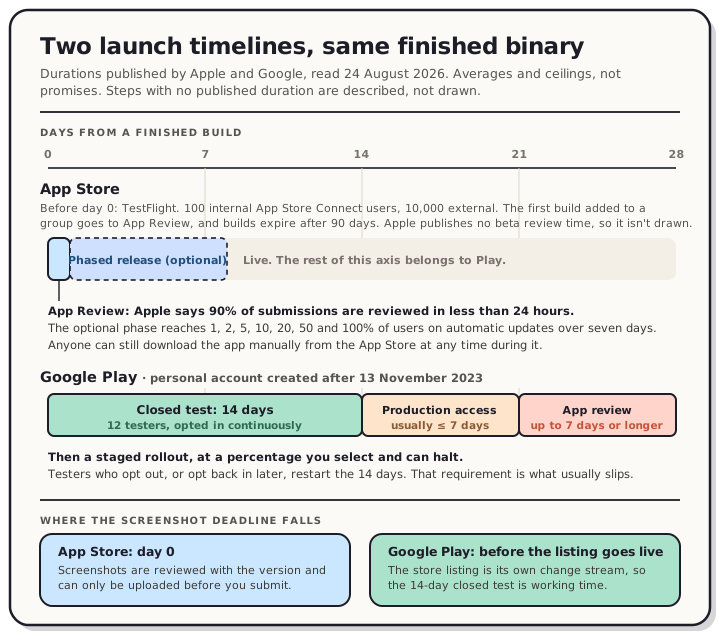
Read the chart description
Both tracks are drawn on a shared scale of 0 to 28 days from a finished build, using durations published by Apple and Google and read on 24 August 2026. The App Store track: before submitting, TestFlight covers up to 100 internal App Store Connect users and up to 10,000 external testers, the first build added to a group is sent to App Review, and builds expire after 90 days; Apple publishes no duration for beta review, so it is not drawn. From day 0, App Review occupies roughly one day, because Apple states that on average 90 percent of submissions are reviewed in less than 24 hours. An optional phased release then runs seven days at 1, 2, 5, 10, 20, 50 and 100 percent of users who have automatic updates on eligible devices, while manual downloads remain available to anyone at any time. The Google Play track, for a personal developer account created after 13 November 2023: a closed test occupying days 0 to 14, requiring at least 12 testers opted in continuously for the preceding 14 days; then an application for production access occupying days 14 to 21, which Google says usually takes seven days or less but can occasionally take longer; then app review occupying days 21 to 28, which for certain accounts and app categories may take up to seven days or longer in exceptional cases; then a staged rollout at a percentage the developer selects and can halt. The footer states where the screenshot deadline falls on each store: on the App Store screenshots are reviewed with the version and can only be uploaded before submission, so the deadline is day 0, while on Google Play the store listing is a separate change stream with its own review, so the 14-day closed test is working time.
The App Store gates
TestFlight. You can add up to 100 App Store Connect users as internal testers, and up to 10,000 people as external testers. Apple's wording on review is worth reading closely, because it hangs on which group you're inviting: "If you invite external testers, your beta build may require review." When the first build is added to a group it goes to App Review to be checked against the App Review Guidelines, and Apple adds that "a review is required only for the first build", with subsequent builds possibly not needing a full one. Testing begins once a build is approved.
Builds don't last. Apple's wording: "You can test a build for up to 90 days," after which "your build becomes unavailable for testers." If your beta drags on past a quarter, you're re-uploading whether you wanted to or not.
App Review. Apple publishes a single headline number on its App Review page: "On average, 90% of submissions are reviewed in less than 24 hours." That's an average across all submissions, not a commitment about yours, and Apple notes that an incomplete submission can delay review. Plan around a day, keep a few in reserve.
Release. Once approved you choose when it goes out, and you can spread it. Phased release runs over seven days, reaching 1%, 2%, 5%, 10%, 20%, 50% and 100% of users on days one through seven. Two details get missed. It only applies to users with automatic updates on eligible devices, and anyone can still download the app manually from the App Store at any time during the phase. A phased release slows the update curve. It doesn't hide the version.
The Google Play gates
The closed test comes first. Google's rule: "Google Play requires personal developer accounts created after November 13, 2023, to test their apps before those apps are eligible for distribution on Google Play." The bar is specific. "At least 12 testers must be opted in to your closed test when you apply for production access, and they must have been opted in continuously for the preceding 14 days."
Continuously is doing real work in that sentence. Google spells out the failure case: testers who opt in, test for fewer than 14 days, then opt out don't count, and if someone opts out and back in, the 14 days have to be consecutive. Recruiting 12 people who stay opted in for two solid weeks is the actual task, and it's the part that slips.
Production access. After the closed test you apply, and the application itself is reviewed. Google: "Review usually takes seven days or less, but can occasionally take longer." If more testing is needed you can be sent back to keep the closed test running.
App review. Separate from all of that. Google says certain apps and certain developer accounts get extended reviews, "which may result in review times of up to 7 days or longer in exceptional cases," and tells you to plan accordingly.
Rollout. Play doesn't impose Apple's fixed curve. "When you roll out a release, you select the percentage of users who will receive your rollout," and if something breaks you can halt it, which stops new users receiving that version while everyone already updated stays put.
The earliest you can be live
This is arithmetic on published gates, not a promise from either company. Both stores describe ceilings and averages, so treat the fast column as a good day and the slow column as the one to plan against.
| App Store | Google Play (new personal account) | |
|---|---|---|
| Before you can submit | TestFlight beta review on the first build, if you're using external testers | 14 days of closed testing with 12 continuous testers |
| Approval step | 90% under 24 hours on average | Production access review, usually 7 days or less |
| Then | Live, or a 7-day phased release | App review, up to 7 days or longer in exceptional cases |
| Realistic floor | A day or two | About three weeks |
An organization account that already has production access skips the first Play row entirely, which is why the requirement lands on solo developers and not on studios. If you're shipping under a personal account opened after November 2023, your Play launch starts 14 days before you thought it did.
Where the screenshot deadline actually falls
"Apple fast, Google slow" gets the practical difference backwards.
On the App Store, screenshots are reviewed with the version. They can only be uploaded while the app is in a pre-submission state, and once it's through, Apple's help is blunt: "Once your app is submitted for review and approved, you must create a new version to update the screenshots." So the screenshot deadline isn't launch day. It's the moment you hit submit. Miss it and your fix costs a whole new version, which we've written about in more detail in how often you can update store screenshots.
On Google Play, the store listing is its own change stream with its own review, independent of any release. Your closed test can run for two weeks against a listing that isn't finished. The screenshots need to clear review before the production listing goes live, not before testing starts.
Flip that around and the slower store is the generous one. Play's 14-day gate is the only stretch of a launch calendar where a required wait hands you working time. Apple's 24-hour turnaround sounds like a gift until you notice it removes every buffer: the binary is ready, review is quick, and the thing holding up the launch is a set of screenshots nobody blocked out time for.
What to do with the 14 days
Treat the closed test as the design window, because it's the only one you get for free.
- Capture once, at the right size, for both stores. The accepted dimensions are on our App Store screenshot sizes and Google Play screenshot sizes pages, kept in step with Apple's and Google's specs.
- Do the iOS set first. It's the one with the hard deadline. Play's can land later without costing you a version.
- Get the required assets out of the way while you wait. The blockers on each store, separated from the things that only cost installs, are in our pre-launch listing checklist.
- Don't let the last build expire. Ninety days is generous until a launch slips twice.
FAQ
How long does App Store review take? Apple states that on average 90% of submissions are reviewed in less than 24 hours. It's an average, not a guarantee, and Apple notes incomplete submissions can be delayed.
Do I need TestFlight before submitting to the App Store? No. TestFlight is optional. If you do use it with external testers, the first build you add to a group goes to App Review before testing can begin, so build that into the schedule.
Does every Google Play developer need 12 testers for 14 days? No. Google applies it to personal developer accounts created after 13 November 2023, which must test before their apps are eligible for distribution. The 12 testers must be opted in continuously for the preceding 14 days at the point you apply for production access.
Can I change my screenshots after launch? On Google Play, yes, as a store listing update with its own review. On the App Store you need a new app version, with the one documented exception being Product Page Optimization.
Does phased release delay my launch? Not really. It staggers automatic updates across seven days, and anyone can still download the app manually from the App Store during that window.
Get the screenshots done before the gate closes
You don't control the store timelines. You do control whether you arrive at submission with a finished set instead of a folder of raw captures.
Open the QuickScreens editor, drop in your captures, and export every size both stores accept. It's a one-time purchase, no subscription, and the export gives you the exact dimensions each slot expects.